Sentence Case Converter

Convert text to sentence case — capitalize the first letter of each sentence and lowercase the rest.

100% Browser-Based Local Processing
15px

Ln 1, Col 1 No selection

Sentence case Nothing to convert
Characters
0
Words
0
Sentences
0
Lines
0

Sentence case lowercases everything and then capitalises the first letter of each sentence — so a name that was shouted in ALL CAPS comes back lowercase, because nothing in the text says it was a name. Common abbreviations (Dr., e.g., etc., p.m.) are recognised and do not start a new sentence. Read the result and fix names and places by eye.

Privacy Focused

🔒 Local Processing. Your text never leaves your device.

Instant Results

🌐 Fully Client-Side. Runs instantly in your browser.

No Signup

⚡ No accounts. No API keys. Just open and use.

Browser Based

🚀 No installs, no sign-ups, no character limits.

What is a Sentence Case Converter?

Sentence Case Converter rewrites your text in sentence case: it capitalizes the first letter of each sentence and the word 'I', and lowercases the rest. It's the fastest way to fix text stuck in ALL CAPS or all lowercase. It runs entirely in your browser, so your text stays private.

When text arrives SHOUTING in all caps or typed entirely in lowercase, sentence case makes it readable again — a capital at the start of each sentence and lowercase everywhere else, exactly how normal prose is written.

This converter detects where sentences begin and fixes the capitalization in one click, entirely in your browser. Paste your text, convert, and copy.
How to convert text to sentence case

Step 1: Paste or type your text into the box

Paste or type your text into the box.

Step 2: Click Convert to Sentence case

Click Convert to Sentence case.

Step 3: Copy the corrected text or download it; tidy up any proper nouns if needed

Copy the corrected text or download it; tidy up any proper nouns if needed.

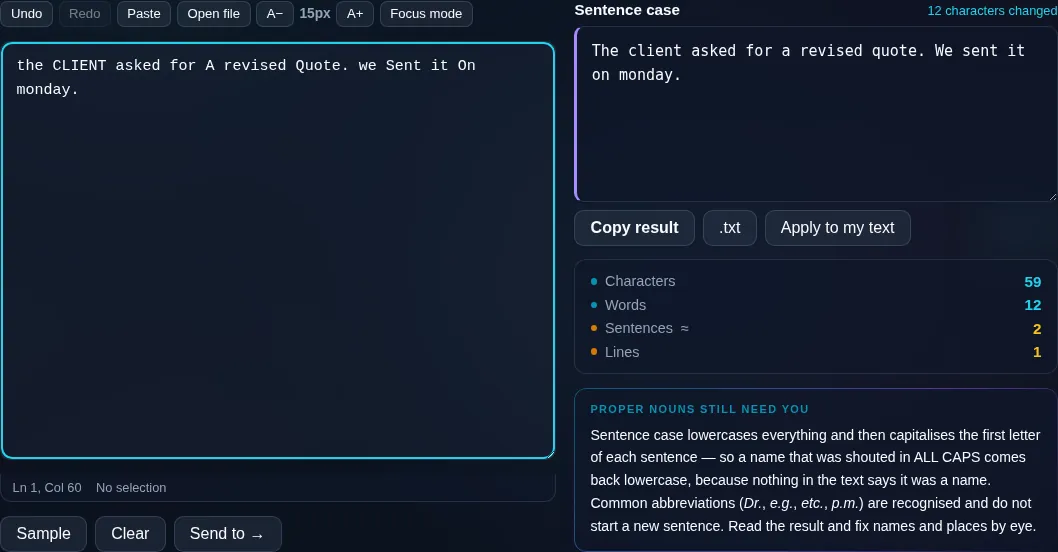
Sentence Case Converter in action

Sentence Case Converter fixing capitalization in the browser.
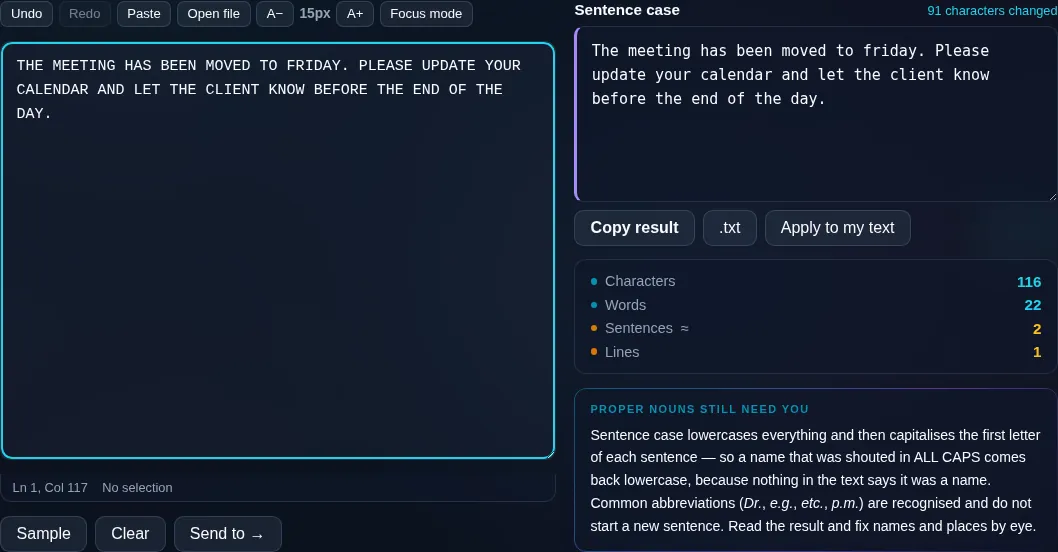
Sentence case result
ALL-CAPS text converted to readable sentence case.
ALL-CAPS fixed
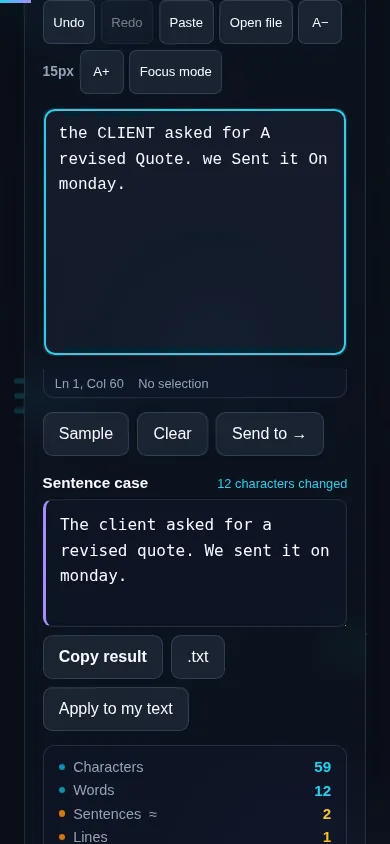
Converting text to sentence case on a phone, no app installed.
Mobile (stacked)

What sentence case does

Sentence case lowercases your whole text, then capitalizes the first letter after each sentence-ending mark (a period, question mark, or exclamation point), plus the standalone word 'I'. That converts ALL-CAPS or all-lowercase text into normal, readable prose. The tricky part is that the tool detects sentence boundaries heuristically, so an abbreviation like 'Dr.' or 'etc.' could occasionally be read as the end of a sentence, and proper nouns (names, places, brands) won't be re-capitalized automatically — both are quick manual fixes after converting. Everything runs locally in your browser, so even long passages convert instantly and nothing is uploaded. For headings rather than prose, use the Title Case Converter.

Frequently Asked Questions

What is sentence case?

Sentence case is the normal way prose is capitalized: the first letter of each sentence is a capital, the word 'I' is capitalized, and everything else is lowercase. It's what you'd use for paragraphs, descriptions, and body text — as opposed to Title Case, which is for headings.

How do I fix text that's in ALL CAPS?

Paste the all-caps text and click Convert to Sentence case. The tool lowercases everything, then capitalizes the start of each sentence, turning a shouting block of text back into readable prose in one step. Proper nouns may need a quick manual capital afterwards.

Does it capitalize the word 'I'?

Yes. The standalone pronoun 'I' is always capitalized in sentence case, so the tool handles it automatically along with the first letter of each sentence. Contractions like 'I'm' and 'I'll' are capitalized too.

How does it know where a sentence ends?

It looks for sentence-ending punctuation — periods, question marks, and exclamation points — and capitalizes the next letter. This works well for normal text, though abbreviations such as 'Dr.' or 'e.g.' can occasionally be mistaken for a sentence end, which is easy to correct manually.

Will it re-capitalize names and places?

Not automatically. The tool lowercases everything except sentence starts and 'I', so proper nouns like 'London' or 'Sarah' come back lowercase and need a manual capital. This is a limitation of any sentence-case tool, since it can't reliably tell a name from an ordinary word.

How is sentence case different from title case?

Sentence case capitalizes only the first word of each sentence — it's for paragraphs and body text. Title Case capitalizes the main words of a heading. Use sentence case to fix prose, and the Title Case Converter for titles and headlines.

Is my text private — is anything uploaded?

No. Everything runs in your browser, so whatever you type or paste is processed on your own device and never uploaded to a server. Nothing is stored once you close the tab. That keeps your text — notes, code, documents, lists — completely private.

Is it free, and do I need to sign up?

Yes, it's completely free with no account, no trial, and no limit on how many times you use it. Because it runs entirely in your browser, there are no server costs, no usage caps, and no watermark or branding added to your text.

Does it work on a phone?

Yes. It runs in your phone's browser with nothing to install, so you can use it on Android or iOS. The layout adapts to small screens, so you can paste text, get the result, and copy it on the go just as easily as on a computer.

Does it work offline?

Once the page has loaded, it runs entirely on your device, so it keeps working without a connection — which is also why nothing is uploaded. You only need to be online to open the page the first time; after that the tool works locally.

Can I copy or download the result?

Yes. You can copy the result to your clipboard with one click, and longer output can be downloaded as a text file. Everything is processed locally, so copying and downloading are instant with no upload step and no waiting.

Is there a limit on how much text I can process?

There's no artificial cap, because the work happens on your device rather than a server. The practical limit is your device's memory, so very large inputs are smoother on a computer than an older phone. For most everyday text, processing is effectively instant.

Still have questions?

If you can't find the answer you're looking for, feel free to contact our support team.

Contact Us