Profit Margin Calculator

Calculate profit margin and markup from cost and price — shown side by side, with the formulas.

100% Browser-Based Local Processing

This is gross margin on one item — price against its direct cost. It does not include overheads, wages, shipping, payment fees or tax, so it is not net profit. A pricing estimate, not financial or business advice.

Profit margin

33.33%

Margin of the price 33.33%
Markup on the cost 50.00%
Profit per unit 15.00
Selling price 45.00
Formula and working

The formula

Margin % = (price − cost) ÷ price × 100 · Markup % = (price − cost) ÷ cost × 100

Your numbers

(45.00 − 30.00) ÷ 45.00 = 33.33% margin, and the same 15.00 of profit is a 50.00% markup on the 30.00 cost.

An estimate, not financial advice. Figures are indicative, and the assumptions behind them are stated on the tool itself. Tax rules, rates and fees vary by country and change over time — check against your provider or a qualified adviser before acting on a number.

Privacy Focused

🔒 Local Processing. Your salary and balances never leave your device.

Instant Results

🌐 Fully Client-Side. Runs instantly in your browser.

No Signup

⚡ No accounts. No API keys. Just open and use.

Browser Based

🚀 No installs, no sign-ups, no bank account linking.

What is a Profit Margin Calculator?

A Profit Margin Calculator finds your profit and both margin and markup from cost and price. Margin % = (Price − Cost) ÷ Price × 100 (profit as a share of the sale); Markup % = (Price − Cost) ÷ Cost × 100 (profit as a share of cost). They're different — a 50% markup is only a 33.3% margin.

Margin and markup both describe the profit between what something costs you and what you sell it for — but they're calculated against different bases, and confusing them is one of the most common (and expensive) pricing mistakes. This calculator gives you both, side by side, from a cost and a price, and shows the formulas so you can trust and reuse them.

The maths: your profit is simply Price − Cost. Margin expresses that profit as a share of the selling price: Margin % = (Price − Cost) ÷ Price × 100. Markup expresses the same profit as a share of the cost: Markup % = (Price − Cost) ÷ Cost × 100. Because the price is always bigger than the cost, markup is always a larger percentage than margin for the same sale. A classic example: buy for $10, sell for $15 — that's a 50% markup ($5 on a $10 cost) but only a 33.3% margin ($5 on a $15 price). Quote "50%" to mean margin when you meant markup and you'll under-price every item.
How to calculate profit margin and markup

Step 1: Enter the cost. What the item costs you (its direct cost)

Enter the cost. What the item costs you (its direct cost).

Step 2: Enter the selling price. What you sell it for — or switch to a solve-for mode

Enter the selling price. What you sell it for — or switch to a solve-for mode.

Step 3: Read profit, margin, and markup. You get the profit amount, the margin %, and the markup %, side by side, with the formulas

Read profit, margin, and markup. You get the profit amount, the margin %, and the markup %, side by side, with the formulas.

Step 4: Or solve backwards. Enter a cost plus a target margin (or markup) to get the price to charge, or a price plus a margin to find the implied cost

Or solve backwards. Enter a cost plus a target margin (or markup) to get the price to charge, or a price plus a margin to find the implied cost.

Step 5: Copy the results. Grab any figure for your pricing or quote

Copy the results. Grab any figure for your pricing or quote.

Profit Margin Calculator in action

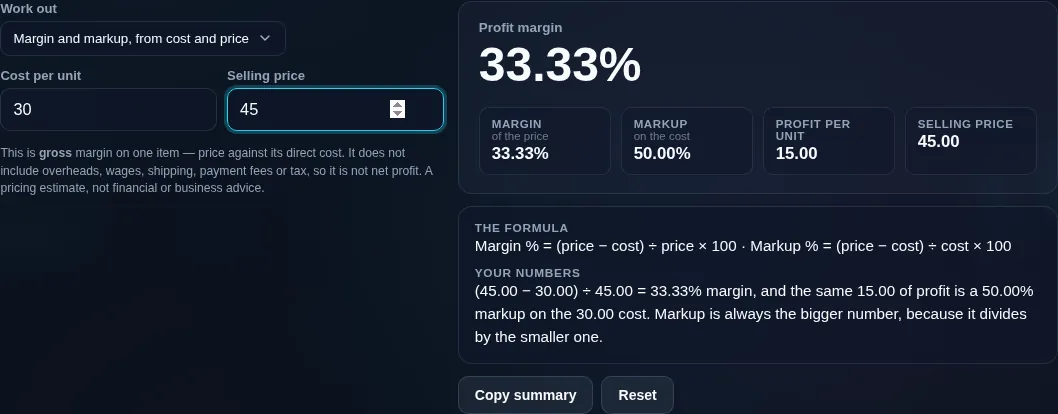
Profit margin calculator on a 30.00 cost and a 45.00 selling price — a 33.33% margin, a 50.00% markup and 15.00 of profit per unit
Margin & markup side by side + formulas
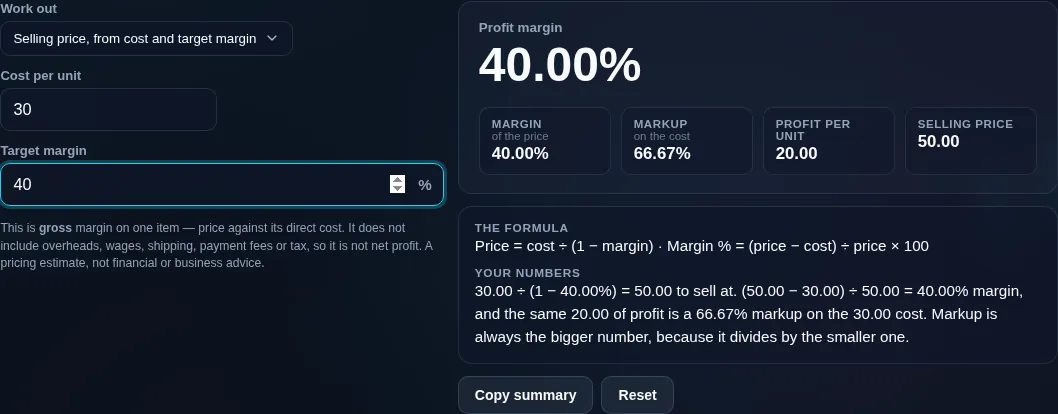
The same cost solved backwards from a 40% target margin, giving a 50.00 selling price and a 66.67% markup
Solve-for-price from a target margin
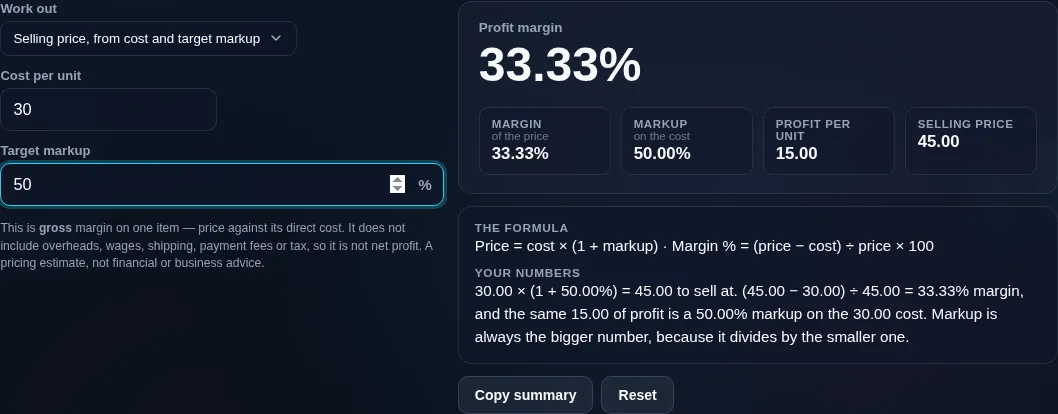
The same 30.00 cost with a 50% target MARKUP instead, which is only a 33.33% margin — the same 15.00 of profit described two ways
Margin-vs-markup explainer (50% ≠ 50%)
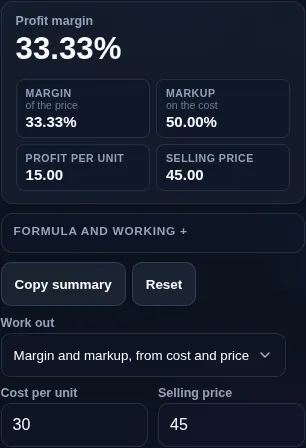
Profit margin calculator running in a phone browser, with the cost, price and margin cards stacked
Mobile browser

When a profit margin calculator helps

You can also work backwards. Enter a cost and a target margin to get the selling price you should charge (Price = Cost ÷ (1 − margin)), or a cost and a target markup for the price (Price = Cost × (1 + markup)) — handy for pricing a product from scratch.

One honesty note: this is gross margin on a single item — the gap between the selling price and that item's direct cost. It doesn't subtract overheads, staff, rent, shipping, payment fees, or taxes, so it isn't your net profit; your business's real bottom line is lower. Everything runs privately in your browser — nothing uploaded — and it works with any currency. To take a discount off the price, see the Discount Calculator.

  • Pricing products. Set a selling price for a target margin or markup.
  • Checking a deal. See the real margin behind a supplier's "markup".
  • Retail & e-commerce. Work out per-item margin across a catalog.
  • Converting margin and markup. Translate one into the other correctly.
  • Quoting jobs. Price a service from cost plus a target margin.

Realistic example. Cost $40, price $60. Profit = $20. Margin = 20 ÷ 60 = 33.3%. Markup = 20 ÷ 40 = 50%. Same $20 profit, two very different percentages — which is exactly why the tool shows both.

Advanced tip. To price for a target *margin*, use Price = Cost ÷ (1 − margin). For a 40% margin on a $30 cost: 30 ÷ 0.6 = $50. (Using markup instead would give a different, lower price — don't mix them up.)

Common mistake to avoid. Never assume markup and margin are the same. A "40% markup" is only a 28.6% margin — a big gap that erodes profit if you price by the wrong one.

Related. For percentages generally, see the Percentage Calculator.

What this calculates — and what it doesn't

  • Margin ≠ markup. They use different bases; markup % is always higher than margin % for the same sale. The tool shows both.
  • This is gross margin on one item. Price minus that item's direct cost — not your net profit.
  • Overheads, taxes, and fees aren't included. Rent, staff, shipping, payment processing, and tax all reduce real profit; factor them in separately.
  • Margin can't reach 100%. That would require a zero cost; markup, by contrast, has no upper limit.
  • Currency-agnostic and private. Works in any currency, and all maths runs on your device — nothing uploaded.

Frequently Asked Questions

How do I calculate profit margin?

Profit margin is your profit as a percentage of the selling price: Margin % = (Price − Cost) ÷ Price × 100. First find the profit (Price − Cost), then divide by the price and multiply by 100. For example, a $60 item costing $40 has a $20 profit and a margin of 20 ÷ 60 = 33.3%. The tool shows this with the formula.

---

How do I calculate markup?

Markup is your profit as a percentage of the cost: Markup % = (Price − Cost) ÷ Cost × 100. Take the profit (Price − Cost) and divide by the cost. For the same $60 item costing $40, markup is 20 ÷ 40 = 50%. Notice the markup (50%) is higher than the margin (33.3%) for the exact same sale — because it's measured against the smaller cost.

---

What's the difference between margin and markup?

Both measure the same profit, but against different bases. Margin is profit as a share of the selling price; markup is profit as a share of the cost. Because the price is larger than the cost, markup % is always higher than margin % for the same sale. Confusing them leads to mispricing, which is why this calculator shows both side by side.

---

Is a 50% markup the same as a 50% margin?

No — this is the classic mistake. A 50% markup means the price is 50% above cost (buy $10, sell $15), which is only a 33.3% margin ($5 profit on a $15 price). A true 50% *margin* on that $10 cost would need a $20 price. Quoting one when you mean the other systematically over- or under-prices your products.

---

How do I convert markup to margin (and back)?

Margin = markup ÷ (1 + markup), and markup = margin ÷ (1 − margin), using decimals. So a 50% markup is 0.5 ÷ 1.5 = 33.3% margin; a 40% margin is 0.4 ÷ 0.6 = 66.7% markup. The calculator does the conversion automatically by showing both figures for the same cost and price, so you never have to do it by hand.

---

How do I set a selling price for a target margin?

Use Price = Cost ÷ (1 − margin), with the margin as a decimal. For a 40% margin on a $30 cost: 30 ÷ (1 − 0.4) = 30 ÷ 0.6 = $50. Don't use the markup formula for this — pricing a 40% *markup* on $30 would give only $42, a much lower price. The tool's solve-for mode does this correctly from your target margin.

---

Is this gross margin or net margin?

Gross. This calculates the margin on a single item — its selling price minus its direct cost. Net margin subtracts everything else your business spends: rent, staff, marketing, shipping, payment fees, and taxes. So your net profit is lower than the gross margin shown here. Use this for pricing individual items, and a full profit-and-loss for your business's true bottom line.

---

What's a "good" profit margin?

It varies enormously by industry — grocery retail runs on thin single-digit margins, while software can exceed 80%. So there's no universal "good" number; compare against typical margins for your sector and your own costs. What matters more is whether your margin covers all your overheads and leaves a net profit, which this single-item gross figure doesn't show on its own.

---

Can profit margin be over 100%?

No. Because margin is profit divided by the selling price, and profit can't exceed the price (you can't make more than 100% of what you sold for), margin maxes out just below 100% — which would require a cost of zero. Markup, by contrast, has no upper limit: selling something that cost $1 for $100 is a 9,900% markup but a 99% margin.

---

Does this include overheads, taxes, or fees?

No. It's a gross, single-item calculation: selling price minus that item's direct cost. It doesn't subtract overheads (rent, staff), shipping, payment-processing fees, or taxes, all of which reduce your actual profit. For your real bottom line, work out net profit across your whole business; use this tool to price items and understand margin versus markup.

---

Can I use it for retail, restaurants, or e-commerce?

Yes — the margin and markup formulas are the same in any business. Enter the item's cost and selling price and you get the margin and markup instantly, in any currency. Just remember it's gross margin per item, so for a restaurant or shop you'll still need to account for labor, rent, and other costs separately to see whether the overall business is profitable.

---

Is my data uploaded, and does it work offline?

No upload, and yes it works offline. Every calculation runs entirely in your browser, so your cost and price figures are never sent to a server, there's no account, and no tracking. Once the page has loaded it keeps working with no connection — handy for pricing on the go or with commercially sensitive figures you'd rather keep private.

Still have questions?

If you can't find the answer you're looking for, feel free to contact our support team.

Contact Us