Debt Payoff Calculator

Calculate how long to pay off your debt and the total interest, and compare the snowball and avalanche methods.

100% Browser-Based Local Processing
%

Assumes a fixed rate and no new spending on the account — putting fresh charges on a card you are paying down is what turns a two-year plan into a permanent one. Not financial advice; if the payment is unaffordable, a non-profit debt adviser is a better first call than a calculator.

Paid off in

3 yr 8 mo

Total interest 2,769.35
Total repaid 8,769.35
First month's interest 109.50
Extra payment saves Add an extra payment
Formula and working

The formula

each month: interest = balance × APR ÷ 12, then balance −= (payment − interest)

Your numbers

Waiting for your numbers.

Privacy Focused

🔒 Local Processing. Your numbers never leave your device.

Instant Results

🌐 Fully Client-Side. Runs instantly in your browser.

No Signup

⚡ No accounts. No API keys. Just open and use.

Browser Based

🚀 No installs, no sign-ups, no server round-trip.

What is a Debt Payoff Calculator?

A Debt Payoff Calculator shows how long it'll take to clear a debt and how much interest you'll pay, based on the balance, interest rate, and your monthly payment. Add an extra payment to see the time and interest saved, or compare the snowball (smallest balance first) and avalanche (highest rate first) methods across several debts. It runs in your browser.

Knowing your debt-free date — and how much interest stands between you and it — turns a daunting balance into a plan. Small changes, like paying a little extra, can cut months and hundreds in interest.

This calculator shows the payoff time and total interest for a debt, the effect of extra payments, and how the popular snowball and avalanche strategies compare. It runs entirely in your browser, so your figures stay private.
How to calculate debt payoff

Step 1: Enter the balance, interest rate, and your monthly payment

Enter the balance, interest rate, and your monthly payment.

Step 2: Add any extra payment to see the time and interest you'd save

Add any extra payment to see the time and interest you'd save.

Step 3: For multiple debts, list them and compare the snowball and avalanche payoff plans

For multiple debts, list them and compare the snowball and avalanche payoff plans.

Debt Payoff Calculator in action

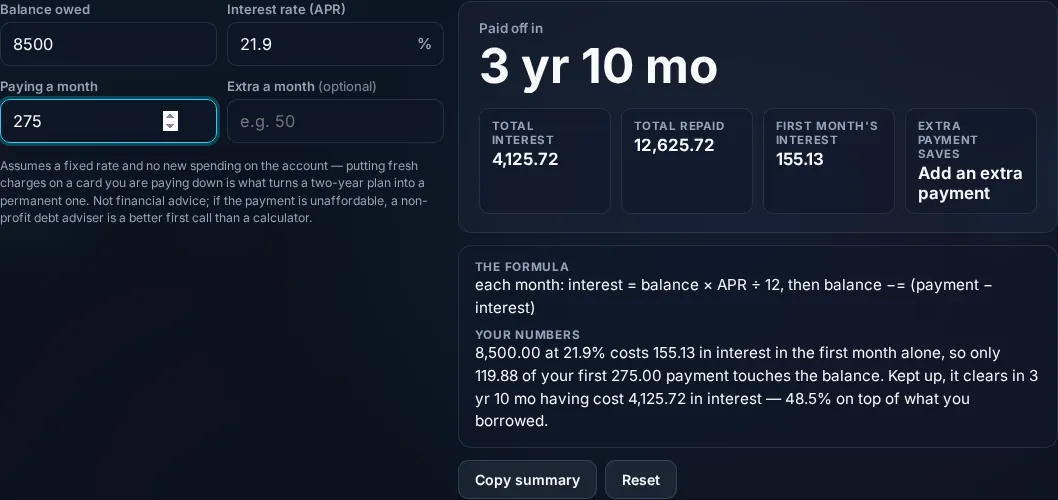
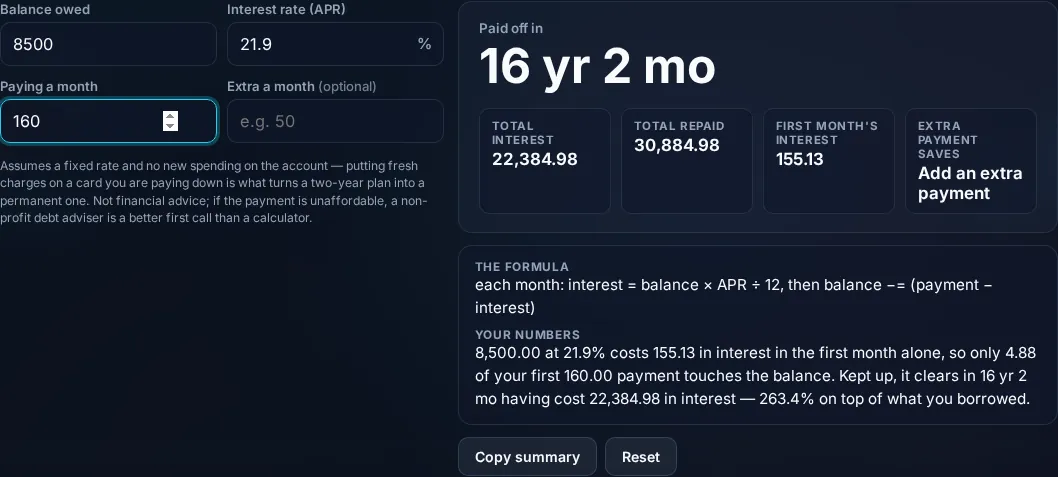
Debt Payoff Calculator showing payoff time and interest in the browser.
Payoff time + interest
Snowball versus avalanche debt payoff comparison.
Snowball vs avalanche
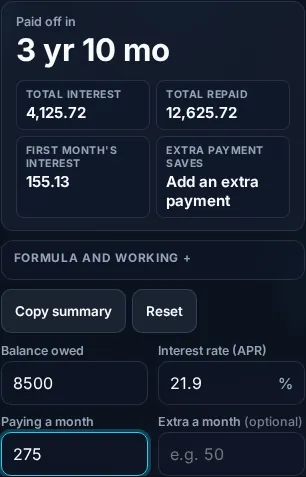
Calculating debt payoff on a phone, no app installed.
Mobile (stacked)

Payoff time, extra payments, and the two strategies

Each month, interest is added to your balance (balance × monthly rate) and your payment reduces it; the calculator iterates this to find how many months until the balance hits zero and totals the interest paid. The single most powerful lever is paying more than the minimum: because interest is charged on the remaining balance, every extra dollar that goes to principal saves future interest and pulls your debt-free date closer — the tool quantifies exactly how much. There's a crucial warning it provides: if your payment is less than the monthly interest, the balance grows instead of shrinking and the debt never clears — common with credit-card minimums. For several debts, two well-known strategies differ in order: the avalanche method pays extra toward the highest-interest debt first, which minimises total interest (mathematically optimal); the snowball method pays the smallest balance first, which clears individual debts faster for motivating quick wins. The calculator compares both so you can choose between the cheapest path and the most motivating one. It assumes fixed rates and steady payments, and it isn't financial advice. Everything computes locally. For a new loan's schedule, see the Loan Calculator.

Frequently Asked Questions

How long will it take to pay off my debt?

It depends on the balance, the interest rate, and your monthly payment. The calculator steps through each month — adding interest, subtracting your payment — until the balance reaches zero, then reports the number of months and total interest. Paying more each month shortens the time considerably.

What's the difference between the snowball and avalanche methods?

Both put extra money toward one debt while paying minimums on the rest. Avalanche targets the highest interest rate first, minimising total interest paid (the cheaper method). Snowball targets the smallest balance first, clearing debts quickly for motivation. The calculator compares both so you can pick cost-efficiency or momentum.

How much do extra payments help?

A lot. Because interest accrues on the remaining balance, extra payments go straight to principal and save all the future interest that balance would have generated — shortening the payoff time and cutting total interest. The calculator shows the months and money saved for any extra amount you add.

Why isn't my credit card balance going down?

Likely because your payment is at or below the monthly interest charge. If interest added each month is more than (or close to) your payment, the principal barely moves or even grows. The calculator flags when a payment is too low to clear the debt — you'd need to pay more than the monthly interest.

Which method should I choose?

If you want to pay the least interest, choose avalanche (highest rate first). If you're motivated by quick wins and seeing debts disappear, choose snowball (smallest balance first). The avalanche is cheaper; the snowball can be easier to stick with. The calculator shows the cost difference so you can decide.

Is this debt calculator financial advice?

No. It estimates payoff time and interest from the figures you enter, assuming fixed rates and steady payments. It doesn't account for changing rates, fees, your full budget, or options like consolidation. Use it to plan and compare, and consult a financial professional or non-profit credit counselor for debt advice.

Is it free, and do I need to sign up?

Yes, it's completely free with no account, no trial, and no limit on how many times you use it. It runs entirely in your browser, so there's no sign-in wall — just open the page and calculate.

Is my data private?

Yes. Everything is calculated in your browser — the numbers you enter are never sent to a server, and nothing is stored once you close the tab. That keeps any personal figures (salary, loan, health) on your own device.

Does it work on mobile?

Yes. It runs in your phone's browser with nothing to install, so you can calculate on Android or iOS. The layout adapts to small screens, so entering numbers and reading the result is easy on the go.

Does it work offline?

Once the page has loaded, the calculation runs entirely on your device, so it keeps working without a connection. You only need to be online to open the page the first time — which is also why nothing you enter is uploaded.

Can I copy or share the result?

Yes. You can copy the result to your clipboard with one click, and many results can be shared. Because everything is calculated locally, copying is instant with no upload step.

How accurate is it, and is this professional advice?

The math is accurate for the inputs you give, and the formula is shown so you can verify it. But results are estimates for general use, not professional advice — finance calculators use simplified assumptions and ignore fees and rate changes, and health calculators are general estimates, not medical advice. For important decisions, consult a qualified professional.

Still have questions?

If you can't find the answer you're looking for, feel free to contact our support team.

Contact Us