Tip Calculator

Calculate a tip and split the bill among any number of people.

100% Browser-Based Local Processing
Tip percentage
%

Tip is worked out on the bill you enter. If your bill already includes tax and you prefer to tip on the pre-tax amount, enter that instead. Everything is calculated in your browser.

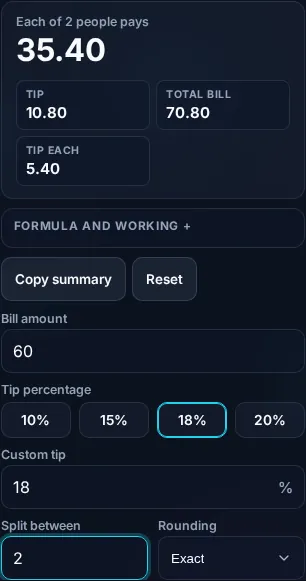
Each person pays

35.40

Tip 10.80
Total bill 70.80
Tip each 5.40
Formula and working

The formula

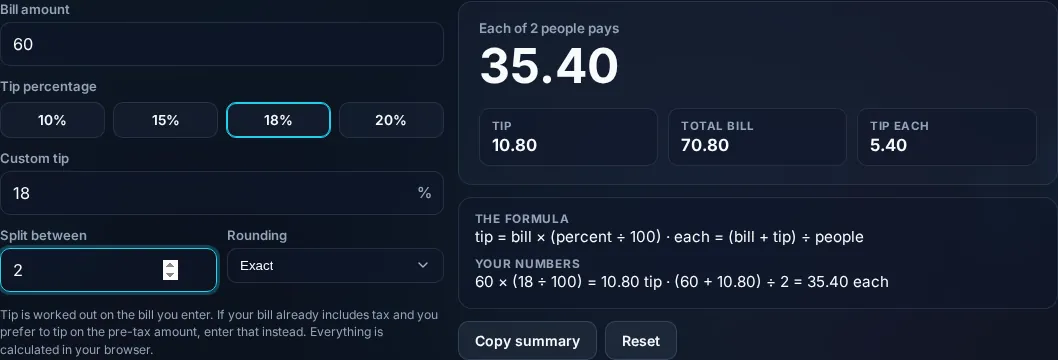
tip = bill × (percent ÷ 100) · each = (bill + tip) ÷ people

Your numbers

60 × (18 ÷ 100) = 10.80 tip · (60 + 10.80) ÷ 2 = 35.40 each

Privacy Focused

🔒 Local Processing. Your numbers never leave your device.

Instant Results

🌐 Fully Client-Side. Runs instantly in your browser.

No Signup

⚡ No accounts. No API keys. Just open and use.

Browser Based

🚀 No installs, no sign-ups, no server round-trip.

What is a Tip Calculator?

A Tip Calculator works out the gratuity on a bill and splits the total between people. Enter the bill, choose a tip percentage, and set how many are paying, and it shows the tip amount, the grand total, and what each person owes. Tip = bill × (tip% ÷ 100). It calculates instantly in your browser.

Working out a tip and dividing the bill at the table — often while everyone's waiting — is exactly the kind of quick math that's easy to fumble. A tip calculator does it in a tap.

This one has the common tip percentages as presets, lets you split among any number of people, and can round for easy cash payment. It runs entirely in your browser, so it works even on patchy restaurant Wi-Fi once loaded.
How to calculate a tip

Step 1: Enter the bill amount

Enter the bill amount.

Step 2: Pick a tip percentage (e.g

15%, 18%, 20%) or enter your own.

Step 3: Set the number of people; read the tip, total, and per-person amount

Set the number of people; read the tip, total, and per-person amount.

Tip Calculator in action

Tip Calculator showing the tip, total, and per-person split in the browser.
Tip + total + per person
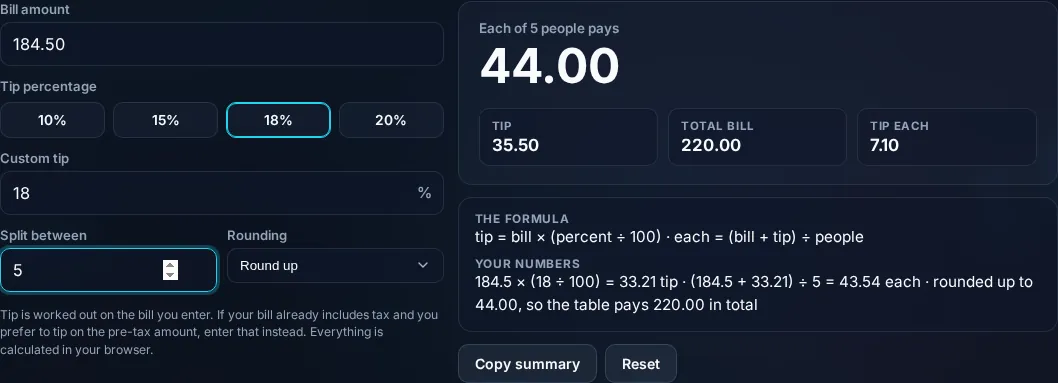
Tip percentage presets and bill split.
Tip presets
Calculating a tip on a phone, no app installed.
Mobile (stacked)

Tip, total, and splitting fairly

The tip is simply the bill multiplied by the tip percentage: a 20% tip on a $50 bill is 50 × 0.20 = $10, making the total $60. Split between, say, four people, that's $15 each. The calculator handles the percentages and the division, with presets for the most common rates so you don't have to type them. A practical detail it manages is splitting cleanly: dividing a total rarely lands on round numbers, so it can round each person's share up to ensure the tip is fully covered (no awkward shortfall). There's also a choice some diners care about — whether to tip on the pre-tax or post-tax amount; the tool can base the tip on the figure you enter, so enter the pre-tax subtotal if you prefer to tip on that. One thing it deliberately doesn't do is tell you how much to tip — tipping customs vary widely by country and situation (table service, takeout, bars), so the percentage is your call; the calculator just does the math. Everything runs locally in your browser. For general percentages, see the Percentage Calculator; for shopping, the Discount Calculator.

Frequently Asked Questions

How do I calculate a tip?

Multiply the bill by the tip percentage divided by 100: tip = bill × (percent ÷ 100). A 20% tip on $50 is 50 × 0.20 = $10. Enter the bill and pick or type the percentage, and the calculator shows the tip and the new total instantly.

How do I split the bill with the tip included?

Add the tip to the bill for the total, then divide by the number of people: per person = (bill + tip) ÷ people. The calculator does this automatically — enter how many are paying and it shows each person's share including their portion of the tip.

Should I tip on the pre-tax or post-tax amount?

Either is common, and it's a personal choice — tipping on the pre-tax subtotal is slightly lower and is what many etiquette guides suggest, while tipping on the total is simpler. Enter whichever figure you want to tip on (the subtotal or the taxed total) and the calculator tips on that amount.

How much should I tip?

That depends on your country, the service type, and quality — norms range from no tipping in some countries to around 15–20% for table service in the US. The calculator includes common presets but doesn't prescribe an amount; choose the percentage that fits your local custom and the service you received.

Can it round the amounts?

Yes. Splitting a total often gives awkward fractions, so the calculator can round each person's share (typically up) so the tip is fully covered and everyone pays a clean amount. This is handy for cash payments where exact change is impractical.

Does it work for any currency?

Yes. The calculator is currency-agnostic — it works with whatever numbers you enter, so it's fine for dollars, euros, pounds, rupees, or any currency. It does the percentage and division math the same way regardless of the symbol.

Is it free, and do I need to sign up?

Yes, it's completely free with no account, no trial, and no limit on how many times you use it. It runs entirely in your browser, so there's no sign-in wall — just open the page and calculate.

Is my data private?

Yes. Everything is calculated in your browser — the numbers you enter are never sent to a server, and nothing is stored once you close the tab. That keeps any personal figures (salary, loan, health) on your own device.

Does it work on mobile?

Yes. It runs in your phone's browser with nothing to install, so you can calculate on Android or iOS. The layout adapts to small screens, so entering numbers and reading the result is easy on the go.

Does it work offline?

Once the page has loaded, the calculation runs entirely on your device, so it keeps working without a connection. You only need to be online to open the page the first time — which is also why nothing you enter is uploaded.

Can I copy or share the result?

Yes. You can copy the result to your clipboard with one click, and many results can be shared. Because everything is calculated locally, copying is instant with no upload step.

How accurate is it, and is this professional advice?

The math is accurate for the inputs you give, and the formula is shown so you can verify it. But results are estimates for general use, not professional advice — finance calculators use simplified assumptions and ignore fees and rate changes, and health calculators are general estimates, not medical advice. For important decisions, consult a qualified professional.

Still have questions?

If you can't find the answer you're looking for, feel free to contact our support team.

Contact Us