Sales Tax Calculator

Add sales tax, VAT or GST to a price, or remove it from a tax-inclusive total, and find the tax amount.

100% Browser-Based Local Processing
What do you need?
%

Rates vary by state, county and city, and some items are exempt — check your local rate. This is an estimate, worked out in your browser.

Total with tax

108.25

Net 100.00
Tax 8.25
Gross 108.25
Formula and working

The formula

gross = net × (1 + rate ÷ 100)

Your numbers

100 × (1 + 8.25 ÷ 100) = 108.25

Privacy Focused

🔒 Local Processing. Your numbers never leave your device.

Instant Results

🌐 Fully Client-Side. Runs instantly in your browser.

No Signup

⚡ No accounts. No API keys. Just open and use.

Browser Based

🚀 No installs, no sign-ups, no server round-trip.

What is a Sales Tax Calculator?

A Sales Tax Calculator adds tax to a price or removes it from a tax-inclusive total. To add: tax = price × (rate ÷ 100), and the gross is price + tax. To remove (reverse) tax from a gross amount: net = gross ÷ (1 + rate ÷ 100). It works for sales tax, VAT, or GST, showing the tax amount and the formula, all in your browser.

Whether you're adding sales tax to a quote or working out the pre-tax amount from a receipt total, it's quick percentage math that's easy to slip up on — especially the reverse calculation.

This calculator does both directions for sales tax, VAT, or GST, and shows the working. It runs entirely in your browser, so your figures stay private.
How to calculate sales tax

Step 1: Enter the amount and the tax rate

Enter the amount and the tax rate.

Step 2: Choose to add tax to a net price, or remove tax from a tax-inclusive total

Choose to add tax to a net price, or remove tax from a tax-inclusive total.

Step 3: Read the tax amount and the net or gross price, with the formula shown

Read the tax amount and the net or gross price, with the formula shown.

Sales Tax Calculator in action

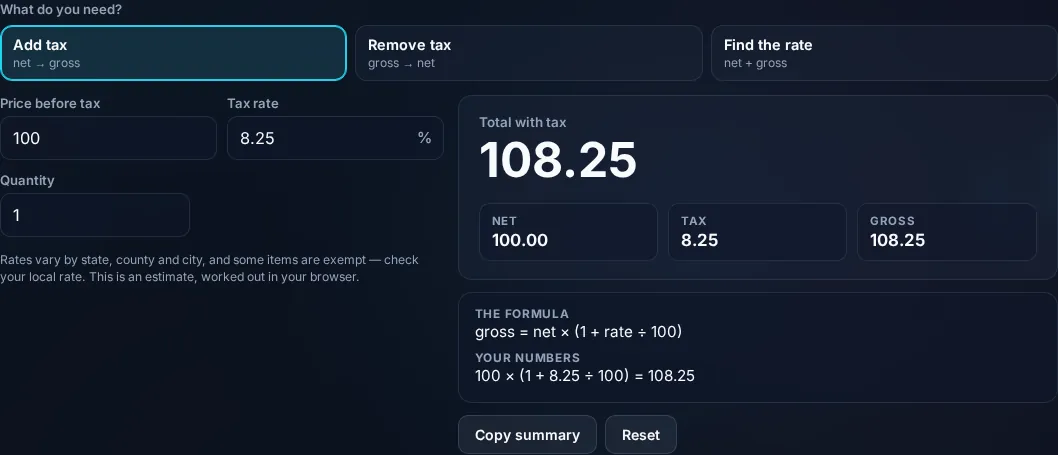
Sales Tax Calculator adding tax to a price in the browser.
Tax + total
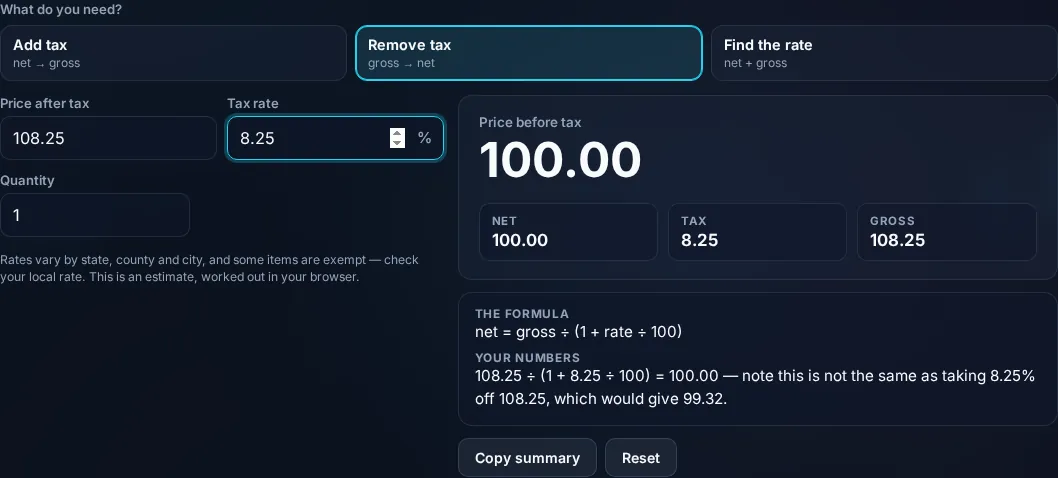
Reverse sales tax finding the pre-tax amount from a total.
Add/remove modes
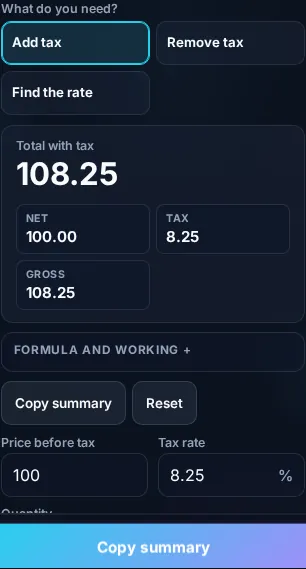
Calculating sales tax on a phone, no app installed.
Mobile (stacked)

Adding versus removing tax

Adding tax is straightforward: the tax is the price times the rate (price × rate ÷ 100), and the total is the price plus that tax — $100 at 8% tax is $8 tax and $108 total. Removing tax (the 'reverse' or 'tax-inclusive' calculation) trips people up, because you can't just subtract the percentage. If a total already includes tax, the pre-tax amount is gross ÷ (1 + rate ÷ 100): a $108 total at 8% has a net of 108 ÷ 1.08 = $100, and $8 of tax. Subtracting 8% of $108 would wrongly give $99.36 — a common mistake the calculator avoids. The same logic covers VAT and GST, which are just sales-tax systems used in different countries; the math is identical, only the name and rates differ. The tool can also simply tell you the tax amount on a given price. It's basic percentage arithmetic, shown so you can verify it, but remember real-world rates depend on your location and sometimes the type of product (some items are tax-exempt or taxed differently), and combined state/local rates vary — so use the rate that applies to your situation. Everything computes locally in your browser. For general percentages see the Percentage Calculator; for shopping deals, the Discount Calculator.

Frequently Asked Questions

How do I add sales tax to a price?

Multiply the price by the tax rate (as a decimal) to get the tax, then add it: total = price × (1 + rate ÷ 100). $100 at 8% is $100 × 1.08 = $108, with $8 of tax. Enter the amount and rate in 'add' mode and the calculator shows the tax and the total.

How do I remove tax from a total (reverse sales tax)?

Divide the tax-inclusive total by (1 + rate ÷ 100): net = gross ÷ (1 + rate ÷ 100). A $108 total at 8% gives 108 ÷ 1.08 = $100 net and $8 tax. You can't just subtract 8% of the total — that gives the wrong answer. The 'remove' mode does this correctly.

Why can't I just subtract the tax percentage to get the pre-tax price?

Because the percentage was applied to the smaller pre-tax amount, not the larger total. Subtracting 8% of a tax-included $108 gives $99.36, but the real pre-tax price is $100. You must divide by 1 plus the rate, not subtract the rate — a very common error the reverse mode prevents.

Does this work for VAT and GST?

Yes. VAT (value-added tax) and GST (goods and services tax) are sales-tax systems used in different countries, and the math to add or remove them is identical to sales tax — only the name and rates differ. Enter your VAT or GST rate and the calculator handles it the same way.

What tax rate should I use?

Use the rate that applies where the sale happens and to the item — rates vary by country, state/province, and city, and combined rates can stack (e.g. state plus local). Some goods are exempt or taxed at special rates. The calculator does the math for any rate you enter; you supply the correct local rate.

Can it just tell me the tax amount?

Yes. Besides adding and removing tax, the calculator can show just the tax on a given price (price × rate ÷ 100), which is handy for invoices, expense tracking, or checking a receipt. You get the tax figure on its own as well as the net and gross totals.

Is it free, and do I need to sign up?

Yes, it's completely free with no account, no trial, and no limit on how many times you use it. It runs entirely in your browser, so there's no sign-in wall — just open the page and calculate.

Is my data private?

Yes. Everything is calculated in your browser — the numbers you enter are never sent to a server, and nothing is stored once you close the tab. That keeps any personal figures (salary, loan, health) on your own device.

Does it work on mobile?

Yes. It runs in your phone's browser with nothing to install, so you can calculate on Android or iOS. The layout adapts to small screens, so entering numbers and reading the result is easy on the go.

Does it work offline?

Once the page has loaded, the calculation runs entirely on your device, so it keeps working without a connection. You only need to be online to open the page the first time — which is also why nothing you enter is uploaded.

Can I copy or share the result?

Yes. You can copy the result to your clipboard with one click, and many results can be shared. Because everything is calculated locally, copying is instant with no upload step.

How accurate is it, and is this professional advice?

The math is accurate for the inputs you give, and the formula is shown so you can verify it. But results are estimates for general use, not professional advice — finance calculators use simplified assumptions and ignore fees and rate changes, and health calculators are general estimates, not medical advice. For important decisions, consult a qualified professional.

Still have questions?

If you can't find the answer you're looking for, feel free to contact our support team.

Contact Us