Fraction Calculator

Add, subtract, multiply, and divide fractions, with simplified results, decimals, mixed numbers, and the steps shown.

100% Browser-Based Local Processing
Operation
First fraction
Second fraction

Leave the first box empty for a plain fraction, or fill it for a mixed number like 2½. Results are always reduced to lowest terms.

1/2 + 1/3 =

5/6

Mixed number 5/6
Decimal 0.8333
Percentage 83.33%
Formula and working

The formula

a/b + c/d = (ad + cb) / bd , then reduce

Your numbers

(1×3 + 1×2) / (2×3) = 5/6

Privacy Focused

🔒 Local Processing. Your numbers never leave your device.

Instant Results

🌐 Fully Client-Side. Runs instantly in your browser.

No Signup

⚡ No accounts. No API keys. Just open and use.

Browser Based

🚀 No installs, no sign-ups, no server round-trip.

What is a Fraction Calculator?

A Fraction Calculator adds, subtracts, multiplies, and divides fractions and gives the answer in lowest terms. Enter two fractions and an operation and it shows the simplified result, its decimal value, and a mixed number where appropriate — with the steps, like finding a common denominator. It handles mixed numbers and runs in your browser.

Fraction arithmetic — common denominators, flipping to divide, simplifying — is fiddly and error-prone by hand. A fraction calculator gives the exact answer in lowest terms and shows how it got there.

This one covers all four operations, accepts mixed numbers, and displays the result as a fraction, a decimal, and a mixed number. It runs entirely in your browser.
How to calculate with fractions

Step 1: Enter the two fractions (whole or mixed numbers work too)

Enter the two fractions (whole or mixed numbers work too).

Step 2: Choose add, subtract, multiply, or divide

Choose add, subtract, multiply, or divide.

Step 3: Read the simplified result, its decimal and mixed-number forms, and the steps

Read the simplified result, its decimal and mixed-number forms, and the steps.

Fraction Calculator in action

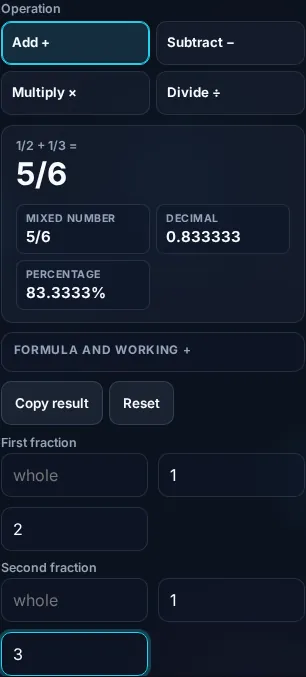
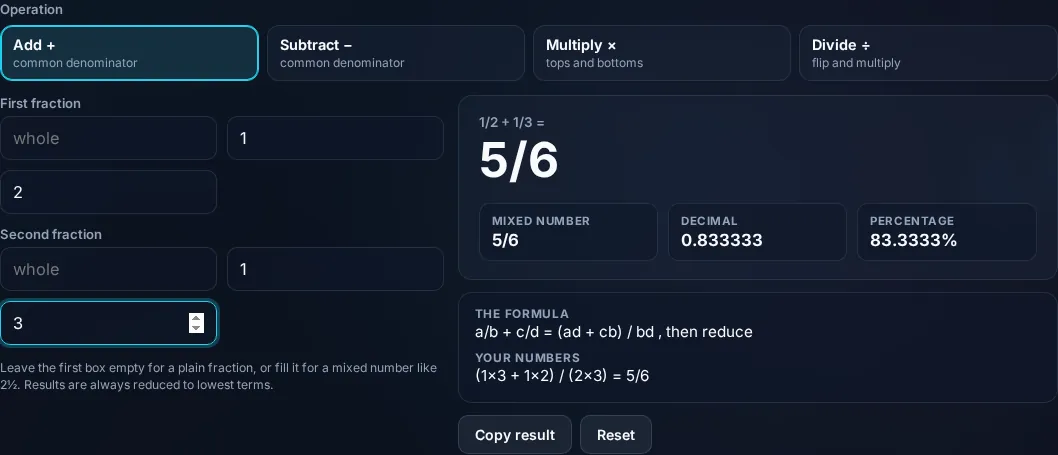
Fraction Calculator adding fractions with steps in the browser.
Result + steps
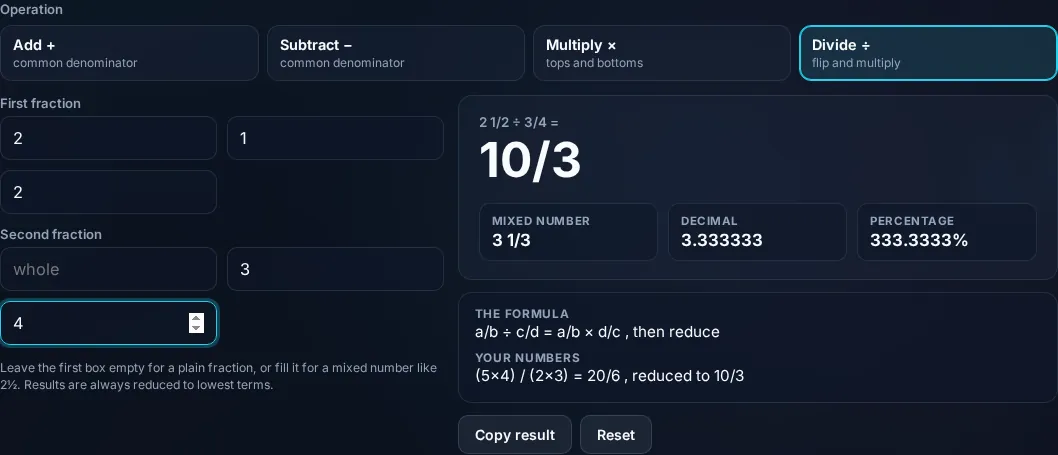
Fraction result as a simplified fraction, decimal, and mixed number.
Mixed/decimal
Calculating fractions on a phone, no app installed.
Mobile (stacked)

The fraction operations, explained

Each operation follows a rule the calculator shows. To add or subtract, you need a common denominator: rewrite both fractions over the same denominator, then add or subtract the numerators — 1/2 + 1/3 becomes 3/6 + 2/6 = 5/6. To multiply, multiply the numerators and the denominators straight across: 2/3 × 4/5 = 8/15. To divide, multiply by the reciprocal (flip the second fraction): 2/3 ÷ 4/5 = 2/3 × 5/4 = 10/12, which simplifies to 5/6. Simplifying any result means dividing the numerator and denominator by their greatest common divisor, which the calculator does automatically so the answer is always in lowest terms. It also converts the result to a decimal and, when the fraction is improper, to a mixed number (like 5/4 → 1 1/4), and it accepts mixed-number input on the way in. The steps are displayed so you can learn or check the method, and it guards against dividing by zero. Everything is exact rational arithmetic computed locally in your browser. For comparing quantities, see the Ratio Calculator; for percentages, the Percentage Calculator.

Frequently Asked Questions

How do I add fractions?

Give them a common denominator, then add the numerators. 1/2 + 1/3 → 3/6 + 2/6 = 5/6. The calculator finds the common denominator, adds, and simplifies the result automatically, showing each step so you can follow how the answer was reached.

How do I multiply fractions?

Multiply the numerators together and the denominators together, then simplify. 2/3 × 4/5 = (2×4) ÷ (3×5) = 8/15. No common denominator is needed for multiplication. The calculator does this and reduces the result to lowest terms, with the working shown.

How do I divide fractions?

Multiply the first fraction by the reciprocal of the second (flip the divisor). 2/3 ÷ 4/5 = 2/3 × 5/4 = 10/12 = 5/6. 'Keep, change, flip' is the rule. The calculator applies it and simplifies, displaying the reciprocal step.

Does it simplify the answer?

Yes, always. The result is reduced to lowest terms by dividing the numerator and denominator by their greatest common divisor — so 10/12 becomes 5/6. It also shows the decimal value and, for improper fractions, the equivalent mixed number, so you get the answer in every useful form.

Can it handle mixed numbers?

Yes. You can enter mixed numbers (like 1 1/2) as input, and the calculator converts them to improper fractions to compute, then presents the result as a simplified fraction, a decimal, and a mixed number where the answer is greater than one. So you can work entirely in mixed numbers if you prefer.

Does it show the steps?

Yes. The calculator displays the working for each operation — finding the common denominator, multiplying across, flipping to divide, and simplifying — so it's useful for checking homework or learning the method, not just getting an answer. Seeing the steps helps you do similar problems by hand.

Is it free, and do I need to sign up?

Yes, it's completely free with no account, no trial, and no limit on how many times you use it. It runs entirely in your browser, so there's no sign-in wall — just open the page and calculate.

Is my data private?

Yes. Everything is calculated in your browser — the numbers you enter are never sent to a server, and nothing is stored once you close the tab. That keeps any personal figures (salary, loan, health) on your own device.

Does it work on mobile?

Yes. It runs in your phone's browser with nothing to install, so you can calculate on Android or iOS. The layout adapts to small screens, so entering numbers and reading the result is easy on the go.

Does it work offline?

Once the page has loaded, the calculation runs entirely on your device, so it keeps working without a connection. You only need to be online to open the page the first time — which is also why nothing you enter is uploaded.

Can I copy or share the result?

Yes. You can copy the result to your clipboard with one click, and many results can be shared. Because everything is calculated locally, copying is instant with no upload step.

How accurate is it, and is this professional advice?

The math is accurate for the inputs you give, and the formula is shown so you can verify it. But results are estimates for general use, not professional advice — finance calculators use simplified assumptions and ignore fees and rate changes, and health calculators are general estimates, not medical advice. For important decisions, consult a qualified professional.

Still have questions?

If you can't find the answer you're looking for, feel free to contact our support team.

Contact Us