Bionic Reading Converter

Bold the first part of each word to guide your eye through text — a bionic-style reading aid.

100% Browser-Based Local Processing
15px

Ln 1, Col 1 No selection

Rendered preview

50%
Rich text Nothing to style yet
Words
0
Words bolded
0
Too short to bold
0

This page implements the general technique of bolding the opening of each word as a fixation point; it is not affiliated with any branded reading app. Whether it makes anyone read faster is not settled — the studies that exist are small and disagree. Treat it as a way of reading that some people find easier, not as a proven speed gain.

Privacy Focused

🔒 Local Processing. Your text never leaves your device.

Instant Results

🌐 Fully Client-Side. Runs instantly in your browser.

No Signup

⚡ No accounts. No API keys. Just open and use.

Browser Based

🚀 No installs, no sign-ups, no character limits.

What is a Bionic Reading Converter?

Bionic Reading Converter bolds the first part of each word so your eye can jump from word to word more quickly — a fixation-style reading aid. You can adjust how much of each word is bold and output either HTML or copy-paste Unicode bold. It runs entirely in your browser, so your text stays private.

The idea behind bionic-style reading is simple: bold the leading letters of each word, and your brain fills in the rest, letting your eyes move faster. Some readers find it genuinely helpful, especially for focus.

This converter applies the effect to any text, with adjustable emphasis, all in your browser. Nothing is uploaded. Paste, convert, and read or copy.
How to convert text for bionic reading

Step 1: Paste or type your text into the box

Paste or type your text into the box.

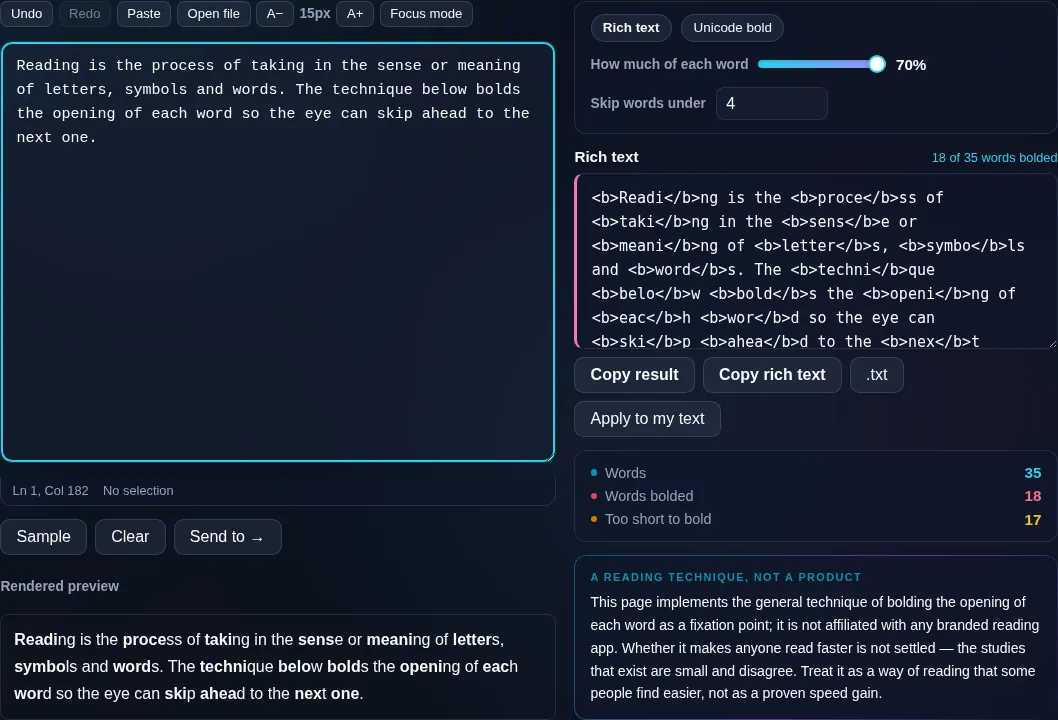
Step 2: Adjust how much of each word is bolded

Adjust how much of each word is bolded.

Step 3: Read it in place, or choose HTML or Unicode-bold output to copy and download

Read it in place, or choose HTML or Unicode-bold output to copy and download.

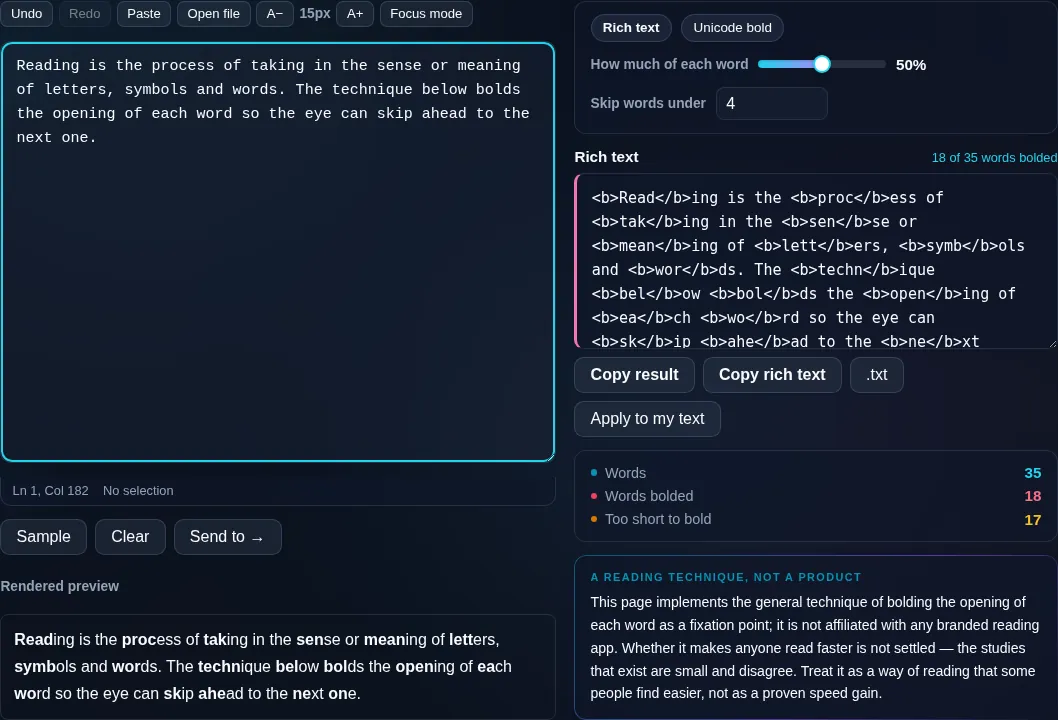
Bionic Reading Converter in action

Bionic Reading Converter bolding word starts in the browser.
Bionic result
Text with the leading part of each word bolded.
Emphasis control
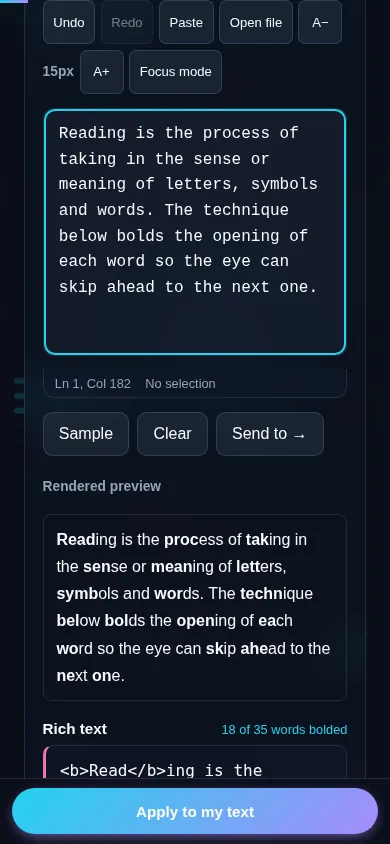
Converting text for bionic reading on a phone, no app installed.
Mobile (stacked)

How it works and what to know

The converter bolds a leading fraction of each word — typically the first one to a few letters depending on word length and your chosen setting — leaving the rest in normal weight. The theory (a 'fixation' reading aid) is that emphasized word-beginnings give the eye anchor points so it can skim faster, and many people report easier focus, though the benefit is individual and not universally proven by research. There are two output modes: HTML with real <b> tags, ideal for pasting into a document, email, or web page where formatting is supported; and Unicode-bold characters, which carry the bold into plain-text fields like social posts that lack formatting (with the usual Unicode caveat that rendering varies and screen-reader support is limited). This is an independent implementation of the fixation-reading concept, not the trademarked Bionic Reading product. Offer readers a way to turn it off, since emphasis can hinder some users. Everything runs locally in your browser.

Frequently Asked Questions

What is bionic-style reading?

It's a reading aid that bolds the first part of each word so your eyes have anchor points and can move through text faster, letting your brain complete each word. Many readers find it helps focus, particularly with long or dense passages.

How do I convert my text?

Paste your text and the converter bolds the leading letters of each word automatically. You can adjust how much of each word is emphasized, then read it in place or export it as HTML or copy-paste bold text to use elsewhere.

Can I control how much of each word is bold?

Yes. A setting adjusts the bolded fraction — emphasize just the first letter for a light effect, or more of each word for a stronger one. The converter also scales the emphasis by word length so short words aren't over-bolded.

What's the difference between HTML and Unicode output?

HTML output uses real bold tags, best for documents, emails, and web pages that support formatting. Unicode-bold output uses bold-looking characters that keep their weight when pasted into plain-text fields like social posts, at the cost of varying rendering and weaker accessibility.

Does bionic reading actually make you read faster?

Some people find it helps focus and speed, but the benefit varies from person to person and isn't conclusively proven by research. Treat it as a tool worth trying rather than a guaranteed speed boost — if it helps you, great; if not, plain text is fine.

Is this the official Bionic Reading app?

No. This is an independent implementation of the general fixation-reading idea — bolding word beginnings — not the trademarked Bionic Reading product or its specific method. It produces a similar effect using your own text, entirely in your browser.

Is my text private — is anything uploaded?

No. Everything runs in your browser, so whatever you type or paste is processed on your own device and never uploaded to a server. Nothing is stored once you close the tab. That keeps your text — notes, code, documents, lists — completely private.

Is it free, and do I need to sign up?

Yes, it's completely free with no account, no trial, and no limit on how many times you use it. Because it runs entirely in your browser, there are no server costs, no usage caps, and no watermark or branding added to your text.

Does it work on a phone?

Yes. It runs in your phone's browser with nothing to install, so you can use it on Android or iOS. The layout adapts to small screens, so you can paste text, get the result, and copy it on the go just as easily as on a computer.

Does it work offline?

Once the page has loaded, it runs entirely on your device, so it keeps working without a connection — which is also why nothing is uploaded. You only need to be online to open the page the first time; after that the tool works locally.

Can I copy or download the result?

Yes. You can copy the result to your clipboard with one click, and longer output can be downloaded as a text file. Everything is processed locally, so copying and downloading are instant with no upload step and no waiting.

Is there a limit on how much text I can process?

There's no artificial cap, because the work happens on your device rather than a server. The practical limit is your device's memory, so very large inputs are smoother on a computer than an older phone. For most everyday text, processing is effectively instant.

Still have questions?

If you can't find the answer you're looking for, feel free to contact our support team.

Contact Us