Uppercase Converter

Convert any text to UPPERCASE instantly.

100% Browser-Based Local Processing
15px

Ln 1, Col 1 No selection

Turkish and Azerbaijani uppercase a dotted i to İ, not I. Leave this on Standard unless you are writing one of those languages — it is the only setting that changes what a letter becomes.

UPPERCASE Nothing to convert
Characters
0
Words
0
Lines
0

The conversion runs in this page, in your browser. Nothing is uploaded, and the result pane is read-only, so your original is never overwritten unless you press Apply to my text.

Privacy Focused

🔒 Local Processing. Your text never leaves your device.

Instant Results

🌐 Fully Client-Side. Runs instantly in your browser.

No Signup

⚡ No accounts. No API keys. Just open and use.

Browser Based

🚀 No installs, no sign-ups, no character limits.

What is a Uppercase Converter?

Uppercase Converter turns any text into UPPERCASE letters instantly. Paste or type your text, click convert, and every letter becomes a capital — numbers, spacing, and punctuation stay exactly as they were. It runs entirely in your browser, so your text is private, and you can copy or download the result.

Sometimes you just need text in ALL CAPS — for a heading, a label, a constant, or emphasis. Rather than holding Shift or retyping, paste it here and convert in one click.

The tool runs entirely in your browser, so nothing is uploaded and it's instant even for long text. Paste, convert, and copy.
How to convert text to uppercase

Step 1: Paste or type your text into the box

Paste or type your text into the box.

Step 2: Click Convert to UPPERCASE — every letter becomes a capital

Click Convert to UPPERCASE — every letter becomes a capital.

Step 3: Copy the result or download it as a .txt file

Copy the result or download it as a .txt file.

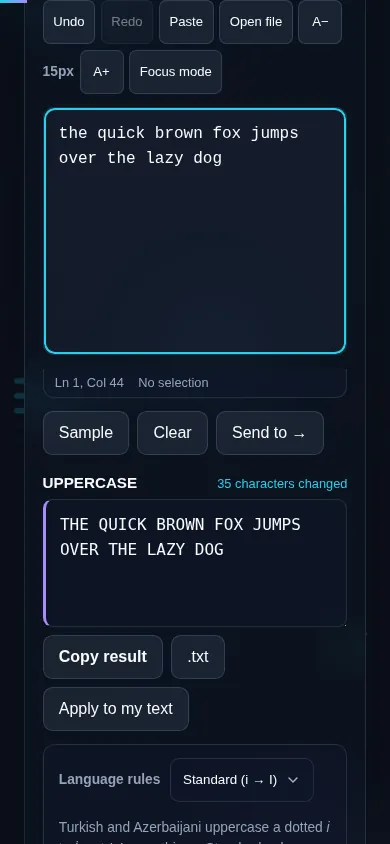
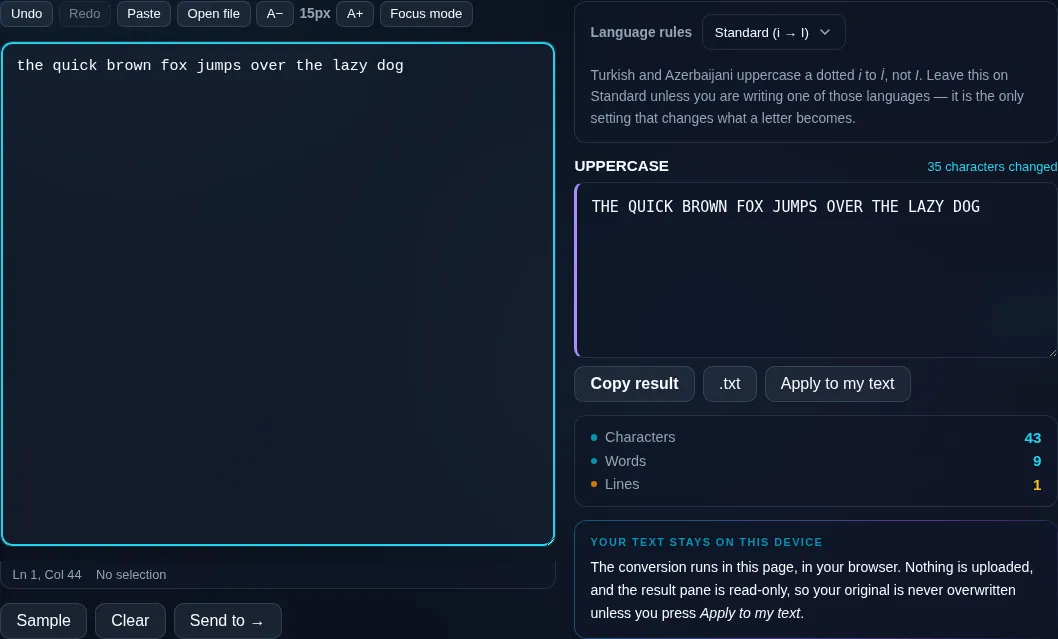
Uppercase Converter in action

Uppercase Converter turning text into capitals in the browser.
Uppercase result
Text converted to UPPERCASE with copy and download.
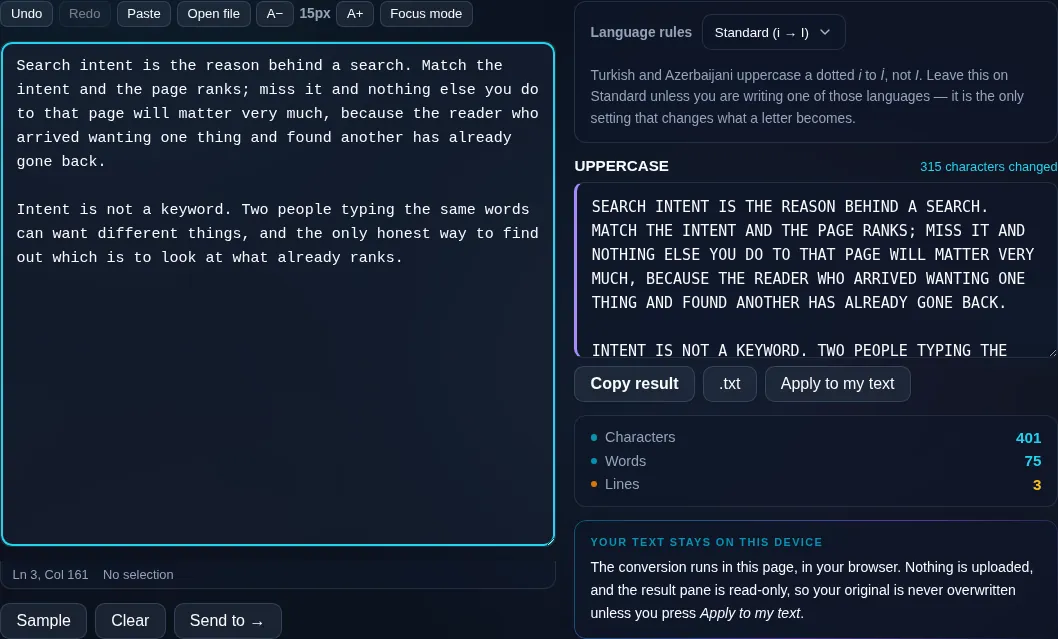
Long text converted
Converting text to uppercase on a phone, no app installed.
Mobile (stacked)

What uppercasing does (and doesn't) change

Converting to uppercase changes only the letters: lowercase becomes capital, while numbers, symbols, spaces, and line breaks are left untouched, so your text's structure is preserved. The conversion is locale-aware, which matters for a few special letters — for example the German ß and Turkish dotless i — that have language-specific uppercase forms. It never changes spelling or wording. Because everything runs locally in your browser, even a long document converts instantly and is never uploaded. If you also need lowercase, title, or sentence case, the all-in-one Case Converter has every style in one place.

Frequently Asked Questions

How do I convert text to uppercase?

Paste or type your text into the box and click Convert to UPPERCASE. Every letter is capitalized immediately, and you can copy the result or download it as a text file. It's faster than holding Shift or retyping, especially for long passages.

Does it change numbers or punctuation?

No. Uppercasing affects only letters — numbers, punctuation, symbols, spaces, and line breaks stay exactly as they were. Your text keeps its original structure and meaning; only the lowercase letters become capitals.

Does it handle accented and non-English letters?

Yes. The conversion is locale-aware, so accented letters like é → É are handled, along with special cases such as the German ß. A few letters have language-specific rules, but for everyday text in most languages the uppercase result is correct.

Is there a limit on how much text I can convert?

No artificial limit — paste a sentence or a whole document. Because the conversion happens on your device, the only practical limit is your device's memory, and even long text converts instantly with no upload or waiting.

Can I switch back to lowercase or another case?

Yes. Your original text stays in the box, so you can convert again or use the all-in-one Case Converter to switch to lowercase, Title Case, or Sentence case. Nothing is locked in until you copy or download.

Why use this instead of typing in caps?

It's quicker and avoids mistakes — you don't have to retype, toggle Caps Lock, or fix a passage you already wrote in mixed case. Paste any existing text and get a clean uppercase version in one click, then copy it wherever you need it.

Is my text private — is anything uploaded?

No. Everything runs in your browser, so whatever you type or paste is processed on your own device and never uploaded to a server. Nothing is stored once you close the tab. That keeps your text — notes, code, documents, lists — completely private.

Is it free, and do I need to sign up?

Yes, it's completely free with no account, no trial, and no limit on how many times you use it. Because it runs entirely in your browser, there are no server costs, no usage caps, and no watermark or branding added to your text.

Does it work on a phone?

Yes. It runs in your phone's browser with nothing to install, so you can use it on Android or iOS. The layout adapts to small screens, so you can paste text, get the result, and copy it on the go just as easily as on a computer.

Does it work offline?

Once the page has loaded, it runs entirely on your device, so it keeps working without a connection — which is also why nothing is uploaded. You only need to be online to open the page the first time; after that the tool works locally.

Can I copy or download the result?

Yes. You can copy the result to your clipboard with one click, and longer output can be downloaded as a text file. Everything is processed locally, so copying and downloading are instant with no upload step and no waiting.

Is there a limit on how much text I can process?

There's no artificial cap, because the work happens on your device rather than a server. The practical limit is your device's memory, so very large inputs are smoother on a computer than an older phone. For most everyday text, processing is effectively instant.

Still have questions?

If you can't find the answer you're looking for, feel free to contact our support team.

Contact Us