Number Base Converter

Convert numbers between binary, octal, decimal, and hexadecimal — all at once, plus any base 2–36.

100% Browser-Based Local Processing

How this conversion works

The relation

Place-value working

    Whole numbers only, and no negatives — a leading minus is refused rather than quietly dropped. There is no rounding anywhere on this page: an integer changes base exactly, in every direction.

    The same number in every common base

    BaseValue

    Privacy Focused

    🔒 Local Processing. The values you enter never leave your device.

    Instant Results

    🌐 Fully Client-Side. Runs instantly in your browser.

    No Signup

    ⚡ No accounts. No API keys. Just open and use.

    Browser Based

    🚀 No installs, no sign-ups, no conversion limits.

    What is a Number Base Converter?

    > Number Base Converter converts a whole number between binary, octal, decimal, and hexadecimal — and any base from 2 to 36. Enter a value in one base and it shows the rest at once. For example, decimal 255 is 11111111 in binary, 377 in octal, and FF in hex. Works offline. ---

    ### H2: Convert between binary, octal, decimal, and hexadecimal

    Every number can be written in different bases — systems that count using a different number of digits. We use decimal (base 10) every day, computers use binary (base 2), programmers use hexadecimal (base 16) for compactness, and octal (base 8) still appears in places like file permissions. This converter handles all four, plus any base from 2 to 36 in the same picker: type a value, pick the base it is in, and the table underneath shows it in every common base at once.

    The idea behind it is place value. In decimal, "255" means 2×100 + 5×10 + 5×1. In binary, each place is a power of two, so 11111111 means 128+64+32+16+8+4+2+1 = 255. In hexadecimal, each place is a power of 16, and the digits run 0–9 then A–F (where A=10, B=11, up to F=15), so FF means 15×16 + 15 = 255. The tool can show this working so you can follow — and check — how a result is reached, rather than trusting a black box.

    Hexadecimal is popular in programming because it lines up neatly with binary: one hex digit equals exactly four binary bits, so a byte (8 bits) is always two hex digits. That's why colours, memory addresses, and byte values are usually written in hex — it's far more compact and readable than long binary strings.

    A couple of honest notes. The tool converts whole numbers (integers); it validates your input, so it won't let you type a "2" in a binary number or a "G" in hex. And representing negative numbers in binary (two's complement) is a separate topic from plain base conversion — this tool works with non-negative integers by default.

    Everything runs on your own device, offline, with nothing uploaded.
    ---

    How to use the Number Base Converter

    Step 1: Enter a value and say what base it is in. Type the number on the left and pick its base from the picker under it

    Letters are fine — hexadecimal uses A–F, and base 36 runs to Z.

    Step 2: Pick the base you want. The picker on the right holds the same 35 bases

    Binary, octal, decimal and hexadecimal sit at the top under Common; everything else is under Other bases.

    Step 3: Read every common base at once. The table beside the converter shows the same number in binary, octal, decimal and hexadecimal, plus whichever base either picker is on

    Read every common base at once. The table beside the converter shows the same number in binary, octal, decimal and hexadecimal, plus whichever base either picker is on.

    Step 4: Open the working. The info button beside the note opens the place-value breakdown — each digit, the power it sits on, and what it contributes

    The rows add up to the answer.

    Step 5: Copy or swap. Copy result gives you the answer without the grouping spaces, so it pastes straight into code

    Swap turns the conversion round.

    Number Base Converter in action

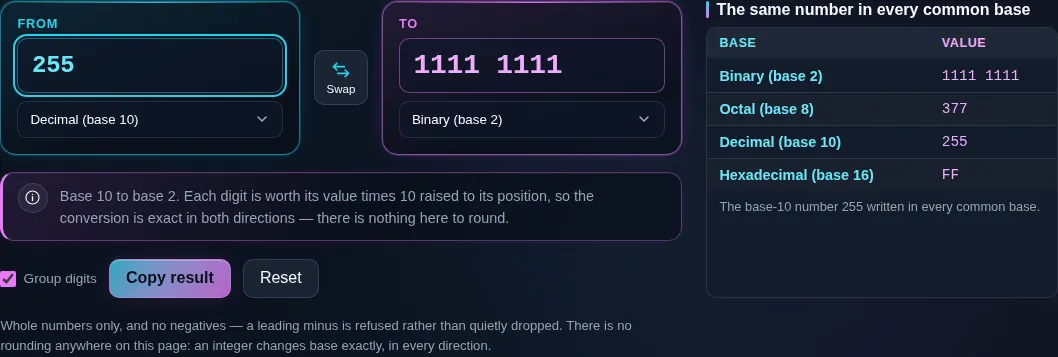
    Number base converter turning 255 in decimal into 1111 1111 in binary, the digits grouped in fours, with a note underneath saying each digit is worth its value times ten raised to its position.
    Converting, with the place-value relation underneath
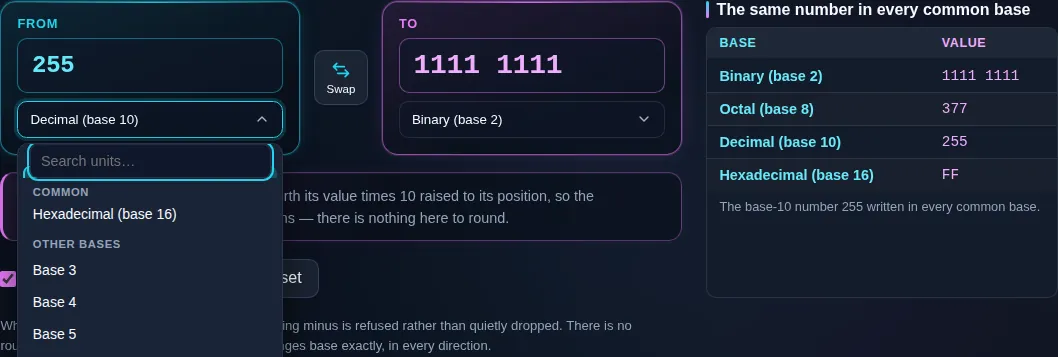
    The open base list scrolled to the boundary between its two sections, the tail of the common bases showing hexadecimal, then the numbered bases beginning at base 3, so any base from 2 to 36 is one click away.
    The base list, from binary to base 36
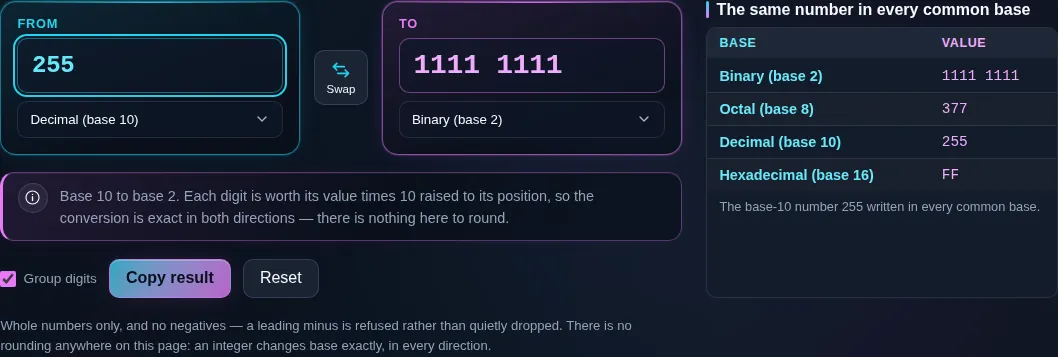
    The all-bases table showing 255 written as 1111 1111 in binary, 377 in octal, 255 in decimal and FF in hexadecimal.
    The same number in every common base
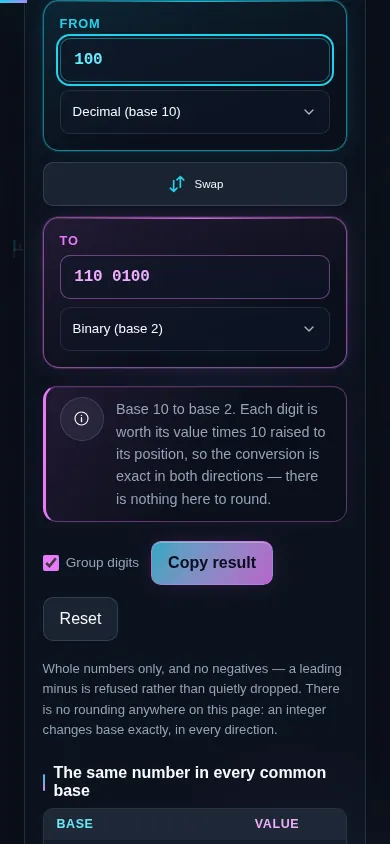
    The number base converter on a phone screen, the two panes stacked with the swap control between them.
    The same tool on a phone

    Frequently Asked Questions

    How do I convert decimal to binary?

    Repeatedly divide the decimal number by 2 and record the remainders, then read them bottom to top. For 13: 13÷2 = 6 r1, 6÷2 = 3 r0, 3÷2 = 1 r1, 1÷2 = 0 r1 → 1101. Each remainder is a binary digit. The tool does this instantly and can show the steps so you can follow the method.

    ---

    How do I convert binary to decimal?

    Multiply each binary digit by its place value (a power of 2) and add them up. For 1101: (1×8) + (1×4) + (0×2) + (1×1) = 8 + 4 + 0 + 1 = 13. The rightmost bit is 1, then 2, 4, 8, and so on leftward. The tool shows this place-value working alongside the result.

    ---

    What is 255 in binary and hexadecimal?

    Decimal 255 is 11111111 in binary (eight 1s, since 128+64+32+16+8+4+2+1 = 255) and FF in hexadecimal (15×16 + 15 = 255). It's a common value because it's the largest number a single byte can hold. In octal it's 377. Enter 255 in the tool and all bases appear at once.

    ---

    How do I convert decimal to hexadecimal?

    Divide by 16 repeatedly and record the remainders, using letters A–F for 10–15, then read bottom to top. For 255: 255÷16 = 15 r15 (F), 15÷16 = 0 r15 (F) → FF. For 254: 254÷16 = 15 r14 (E) → FE. The tool converts instantly and can display the division-remainder steps.

    ---

    What is hexadecimal, and why is it used in programming?

    Hexadecimal is base 16 — it counts using 0–9 then A–F (for 10–15). It's popular in programming because it maps cleanly onto binary: one hex digit equals exactly four bits, so a byte is always two hex digits. That makes memory addresses, colour codes (like #FF8800), and byte values far shorter and easier to read than long binary strings.

    ---

    What do the hex letters A–F mean?

    They're the digits for the values 10 to 15, which base 16 needs beyond the usual 0–9. So A = 10, B = 11, C = 12, D = 13, E = 14, and F = 15. For example, hex 1A is (1×16) + 10 = 26 in decimal. Hex is case-insensitive, so "a" and "A" mean the same; the tool displays a consistent case.

    ---

    What is octal, and where is it used?

    Octal is base 8, counting with digits 0–7. Each octal digit represents exactly three binary bits, so it's a compact way to write binary. Its most common modern use is Unix/Linux file permissions (like "chmod 755"), where each digit encodes read/write/execute bits. It was also common in older computing. The tool converts octal alongside binary, decimal, and hex.

    ---

    Can I convert to an unusual base, like base 3 or base 36?

    Yes. Beyond the common bases, the tool supports any base from 2 to 36. Bases above 10 use letters after the digits 0–9 — so base 16 uses up to F, and base 36 uses all of 0–9 and A–Z. This is handy for puzzles, encoding schemes, and computer-science exercises. Just set the custom base and enter your value.

    ---

    Does this handle negative numbers or two's complement?

    By default it converts non-negative whole numbers. Representing negative numbers in binary uses a scheme called two's complement, which depends on a fixed bit-width (like 8 or 32 bits) and is a separate topic from plain base conversion. For everyday "what is this number in another base" questions, use the standard mode; two's complement is a specialist case.

    ---

    Is base conversion of integers exact?

    Yes, completely. Converting a whole number between bases is exact — there's no rounding, because you're just rewriting the same value with different digit groupings. Decimal 255 *is* binary 11111111 exactly, not approximately. (Rounding only becomes an issue with fractional values in some bases, which is a separate, niche case.) The integer conversions here are always precise.

    ---

    How is this different from "text to binary" or Base64?

    This tool converts numbers between bases (like decimal 65 → binary 1000001). "Text to binary" and "Base64" convert text into a binary or encoded representation of its characters — a different task. For example, the letter "A" is character code 65, which a text tool would encode; here you'd just be converting the number 65. For text, use the dev tools Text to Binary and Base64.

    ---

    Does the tool work offline, and does it upload my data?

    It works fully offline once the page has loaded, and it never uploads anything. Base conversion is pure arithmetic done on your own device — no server, no account, no tracking. That makes it dependable with no signal, and private by design, since nothing you type is ever sent anywhere.

    Still have questions?

    If you can't find the answer you're looking for, feel free to contact our support team.

    Contact Us