Income Tax Estimator

Estimate income tax on tax bands you enter — any country, any year.

100% Browser-Based Local Processing
%
Your bands, lowest first

The bands above are an example, not any country's law — replace them with your own. This tool ships with no built-in tax tables on purpose: hardcoding one country's schedule makes a calculator wrong everywhere else and stale within a year. Each row's figure is the top of that band; the last band has no top and catches everything above it. It estimates one progressive schedule at a time, so social contributions, local taxes, credits, phase-outs and reliefs are not in this number. An estimate, not tax advice.

Income tax

7,840.00

After tax 56,160.00
Taxable income 52,000.00
Effective rate 12.25%
Marginal rate 22.00%
Formula and working

The formula

Taxable = income − allowance − deductions · Tax = Σ (income inside each band × that band's rate)

Your numbers

Waiting for your numbers.

Band by band

An estimate, not financial advice. Figures are indicative, and the assumptions behind them are stated on the tool itself. Tax rules, rates and fees vary by country and change over time — check against your provider or a qualified adviser before acting on a number.

Privacy Focused

🔒 Local Processing. Your salary and balances never leave your device.

Instant Results

🌐 Fully Client-Side. Runs instantly in your browser.

No Signup

⚡ No accounts. No API keys. Just open and use.

Browser Based

🚀 No installs, no sign-ups, no bank account linking.

What is a Income Tax Estimator?

An Income Tax Estimator works out tax on a progressive system. Progressive tax = the sum of the income falling in each band multiplied by that band's rate. A higher bracket only taxes the income above its threshold, not all your income — so your effective rate is lower than your marginal rate.

Most tax calculators are locked to one country and one tax year, so they go out of date and don't help anyone elsewhere. This estimator takes a different approach: you enter the tax bands — the thresholds and rates — along with your income and any tax-free allowance or standard deduction. That makes it work for any country and any year, and it never goes stale.

The math behind a progressive tax is simpler than people think, and it's worth understanding because it's widely misunderstood. Each band taxes only the income that falls within it. If the first slice of income is tax-free, the next taxed at 20%, and a higher slice at 40%, then moving into the 40% band does not tax all your income at 40% — only the portion above that band's threshold. The total tax is the sum of (income in each band × that band's rate). From that, the tool shows your after-tax income, your effective rate (total tax ÷ income) and your marginal rate (the top band you reach), plus a per-band breakdown so you can see exactly where the tax comes from.
How to estimate your income tax

Step 1: Enter your income. Your gross or taxable income for the period

Enter your income. Your gross or taxable income for the period.

Step 2: Add your allowance and deductions. The tax-free amount and any deductions that reduce taxable income

Add your allowance and deductions. The tax-free amount and any deductions that reduce taxable income.

Step 3: Enter the tax bands. Add each threshold and its rate — as many bands as your country uses

Enter the tax bands. Add each threshold and its rate — as many bands as your country uses.

Step 4: Read the result. Total tax, after-tax income, effective rate, and marginal rate

Read the result. Total tax, after-tax income, effective rate, and marginal rate.

Step 5: Check the breakdown. See income taxed and tax due in each band

Copy any figure.

Income Tax Estimator in action

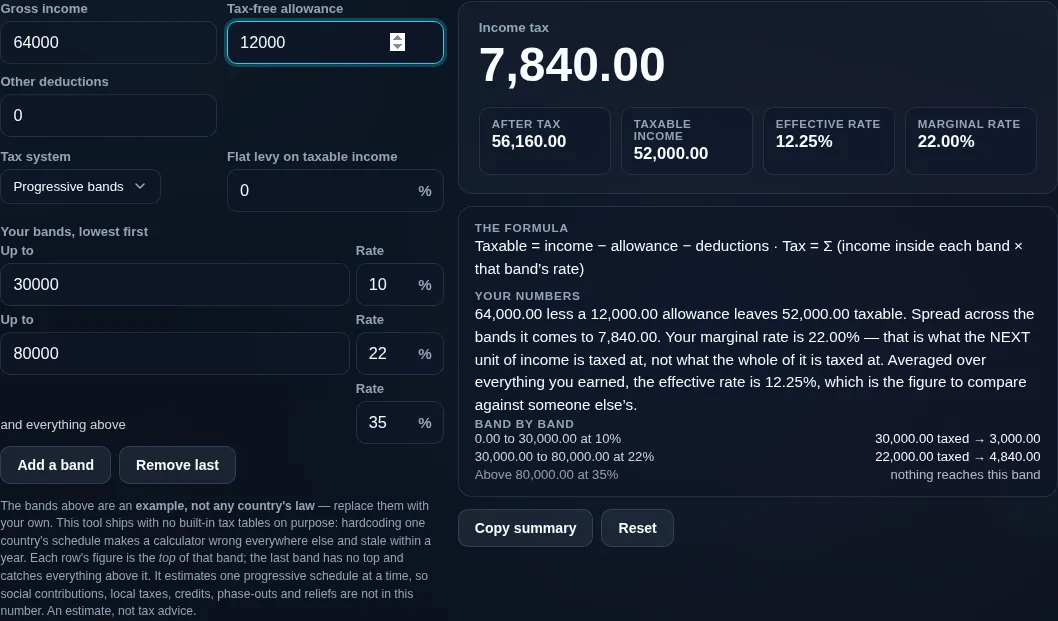
Income tax estimator breaking 52,000 of taxable income across 10%, 22% and 35% bands, showing a 22% marginal rate against a 12.25% effective rate
The band-by-band breakdown, with the marginal and effective rates side by side
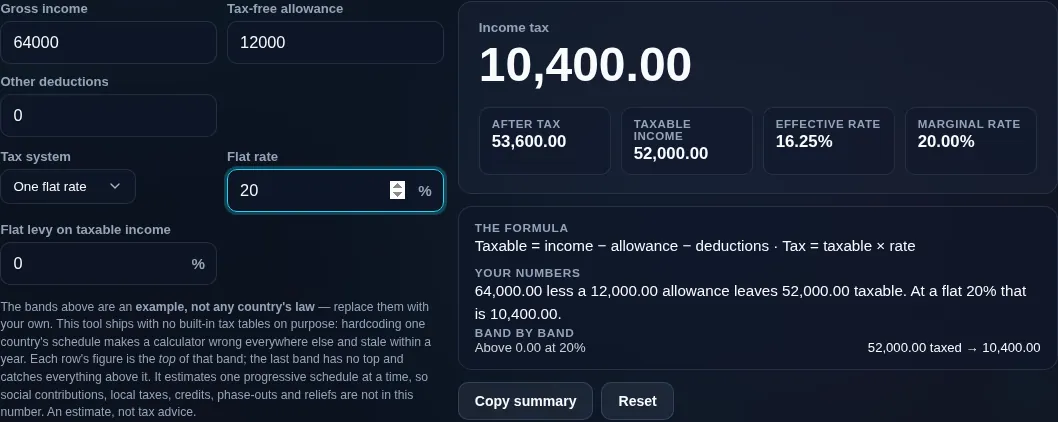
Income tax estimator in flat-rate mode, charging one rate on the whole taxable amount
The same income under one flat rate instead of a progressive schedule
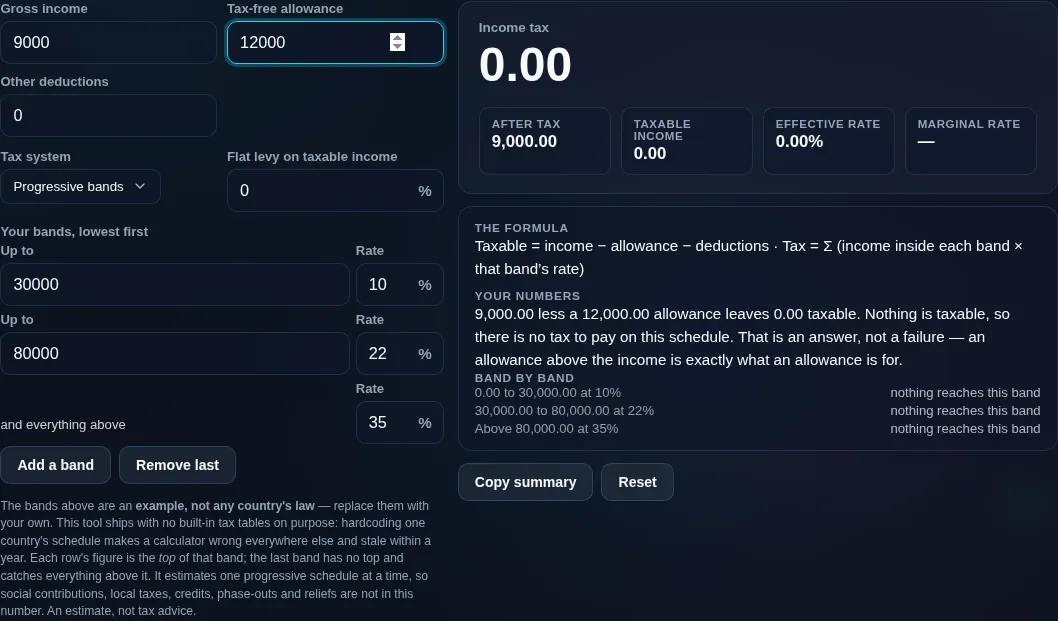
Income tax estimator with an allowance above the income, reporting no tax to pay rather than an error
An allowance larger than the income, which is zero tax rather than an error
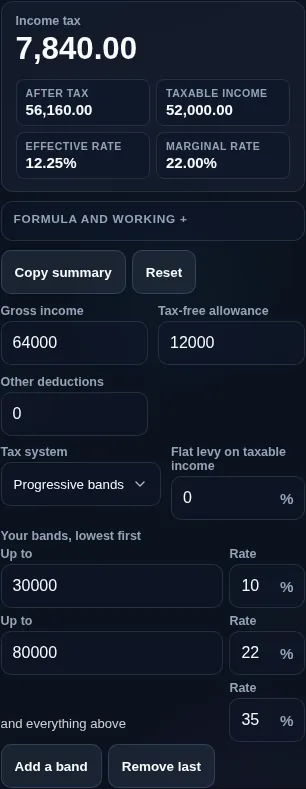
Income tax estimator running in a phone browser, with the band table and the breakdown stacked
Mobile browser

When an income tax estimator helps

Some honesty, because tax is serious. This is an estimate, not tax advice. It's input-driven — the tool ships with no built-in national tax tables, so nothing here is an authoritative statement of any country's law; you supply the numbers. Any example presets are dated and should be verified against official rates. It also models one progressive schedule at a time: real tax bills can include separate state, local, or social-security taxes, tax credits, and phase-outs that this doesn't automatically apply.

For a fuller paycheck picture, see the Take-Home Pay Calculator; if you're self-employed, the Self-Employment Tax Calculator. Everything runs privately in your browser.

  • Any-country estimate. Enter local bands to estimate tax anywhere.
  • Understanding brackets. See why a raise isn't all taxed at your top rate.
  • Effective vs marginal. Know the difference for planning.
  • What-if income. Test how a bonus or raise changes your tax.
  • Teaching. A clean, transparent demo of progressive taxation.

Realistic example. With a 0% allowance on the first 12,000, 20% on 12,000–50,000, and 40% above, an income of 60,000 pays 0 + (38,000 × 20%) + (10,000 × 40%) = 11,600. That's an effective rate of about 19.3%, even though the marginal rate is 40%.

Advanced tip. Watch the gap between effective and marginal rate — it's why only the top slice of a raise is taxed at your highest rate.

Common mistake to avoid. Don't assume entering a higher bracket taxes all your income at that rate. Only the income above the threshold is.

Related. For deductions from a salary specifically, use the Take-Home Pay Calculator.

What to keep in mind

  • An estimate, not tax advice. Real returns include credits, phase-outs, and reliefs this doesn't auto-apply.
  • Input-driven, not built-in law. You enter the bands; the tool has no hard-coded national tax tables, so it's never out of date — and never authoritative.
  • Verify any presets. Example rates are dated; always check current official rates.
  • One tax at a time. State, local, and social taxes are separate; estimate and add them yourself.
  • Private. All math runs on your device — nothing is uploaded.

Frequently Asked Questions

How is income tax calculated?

On a progressive system, tax is the sum of the income falling in each band multiplied by that band's rate. First subtract any tax-free allowance and deductions to get taxable income, then apply each band's rate to the slice of income inside it, and add them up. For example, 38,000 taxed at 20% plus 10,000 at 40% gives 7,600 + 4,000 = 11,600. This tool does that across the bands you enter.

---

How do tax brackets work — does a higher bracket tax all my income?

No — and this is the most common misunderstanding. In a progressive system, each bracket only taxes the income that falls within it. Moving into a higher bracket means only the income above that threshold is taxed at the higher rate; everything below is still taxed at the lower rates. So a raise is never fully taxed at your top rate, and your overall (effective) rate stays below it.

---

What's the difference between effective and marginal tax rate?

Your marginal rate is the rate on your next dollar — the top band your income reaches. Your effective rate is your total tax divided by your total income, which blends all the lower bands in, so it's always lower than the marginal rate. For example, a 40% marginal rate might be a 19% effective rate. The tool shows both, so you can see the difference clearly.

---

Do I have to enter the tax bands myself?

Yes, by design. The tool ships with no built-in national tax tables, so you enter the thresholds and rates for your country and year. That's exactly why it works anywhere and never goes out of date — but it also means the accuracy depends on the bands you provide. If example presets are offered, treat them as a dated starting point to verify, not gospel.

---

Does this work for any country?

Yes. Because you supply the tax bands, allowance, and deductions, the estimator applies to any progressive income-tax system — and to flat-tax systems if you enter a single band. It doesn't assume US, UK, or any particular country's rules. Just enter your local figures, which you can look up from your tax authority's official rates.

---

What's a tax-free allowance or standard deduction?

It's the amount of income that isn't taxed before the bands apply — a personal allowance, standard deduction, or similar depending on your country. You enter it, and the tool subtracts it (along with any other deductions) to get your taxable income, then applies the bands to what's left. A larger allowance lowers both your tax and your effective rate.

---

Does this include state, local, or social security taxes?

No. It estimates a single progressive income-tax schedule — the one whose bands you enter. Separate taxes like US state and local income tax, Social Security and Medicare, or national insurance are not included automatically. If you face several taxes, estimate each and add them, or use the Take-Home Pay Calculator for a combined paycheck view.

---

Does it apply tax credits and phase-outs?

No. The estimator applies your bands, allowance, and deductions, but it doesn't model tax credits (which reduce tax directly), income-based phase-outs, or the many reliefs specific to each country. Those can significantly change a real tax bill. Treat the result as the bracket-based core of your tax, then adjust for credits and reliefs separately.

---

Are the example rates up to date?

Any example presets are dated and are only a convenience — tax bands change most years, and they vary by filing status and region. Always confirm the current thresholds and rates from your official tax authority before relying on a figure. The safest approach is to enter the numbers yourself from an authoritative source.

---

How accurate is the estimate?

It's exactly as accurate as the bands and deductions you enter, for the single schedule it models. The progressive math itself is precise, but a real tax bill also depends on credits, phase-outs, other taxes, and filing details the tool doesn't include. Use it to understand your brackets and get a solid ballpark, not to file or make binding decisions.

---

Is this tax advice?

No. This calculator does arithmetic on the income and tax bands you enter — it's an educational estimate, not tax advice, and not a substitute for your tax authority or a qualified tax professional. For filing or planning decisions, especially anything involving credits, reliefs, or multiple taxes, seek professional guidance.

---

Is my data uploaded, and does it work offline?

No upload, and yes it works offline. Every calculation runs entirely in your browser, so your income and tax details are never sent to a server, there's no account, and no tracking. Once the page has loaded it keeps working with no connection — which matters for something as private as your income.

Still have questions?

If you can't find the answer you're looking for, feel free to contact our support team.

Contact Us