Annuity Calculator

Calculate an annuity's future value, present value, or the fixed income a lump sum pays.

100% Browser-Based Local Processing
%

A fixed-rate model: one rate for the whole term, every payment made on time, nothing withdrawn early. Real annuity products add fees, surrender charges, tax treatment and guarantees that change the answer materially, and inflation is not removed — these are nominal figures. An estimate for comparing shapes, not financial advice or a quote.

Future value

205,516.83

Paid in 120,000.00
Interest 85,516.83
Periods 240
Rate per period 0.4167%
Formula and working

The formula

FV = PMT × [((1 + r)^n − 1) ÷ r]

Your numbers

Waiting for your numbers.

An estimate, not financial advice. Figures are indicative, and the assumptions behind them are stated on the tool itself. Tax rules, rates and fees vary by country and change over time — check against your provider or a qualified adviser before acting on a number.

Privacy Focused

🔒 Local Processing. Your salary and balances never leave your device.

Instant Results

🌐 Fully Client-Side. Runs instantly in your browser.

No Signup

⚡ No accounts. No API keys. Just open and use.

Browser Based

🚀 No installs, no sign-ups, no bank account linking.

What is a Annuity Calculator?

An Annuity Calculator works out an annuity's value or income. Future value = PMT × [((1+r)ⁿ − 1) ÷ r]; the income a lump sum pays = PV × r ÷ (1 − (1+r)⁻ⁿ), where r is the period rate and n the number of periods. This is pure time-value math, not an insurer's product quote.

An annuity is a series of equal payments over time. This calculator answers the three questions people actually ask about them, using transparent formulas you can check:

  • Future value — if you pay in a fixed amount each period at a given rate, what will it grow to? FV = PMT × [((1+r)ⁿ − 1) ÷ r].
  • Present value — what lump sum today is a stream of future payments worth? PV = PMT × [(1 − (1+r)⁻ⁿ) ÷ r].
  • Payout / income — if you have a lump sum, what fixed payment can it provide for a set number of periods? Payment = PV × r ÷ (1 − (1+r)⁻ⁿ).

How to calculate an annuity

Step 1: Choose a mode. Future value (accumulate), present value (lump sum needed), or payout (income from a lump sum)

Choose a mode. Future value (accumulate), present value (lump sum needed), or payout (income from a lump sum).

Step 2: Enter the amounts. A payment per period, or a starting lump sum, depending on the mode

Enter the amounts. A payment per period, or a starting lump sum, depending on the mode.

Step 3: Set the rate and periods. The annual rate, number of years, and payment frequency

Set the rate and periods. The annual rate, number of years, and payment frequency.

Step 4: Pick the timing. Ordinary annuity (end of period) or annuity due (start)

Pick the timing. Ordinary annuity (end of period) or annuity due (start).

Step 5: Read the result. Value or payment, total in/out, and total interest, with the formula

Copy any figure.

Annuity Calculator in action

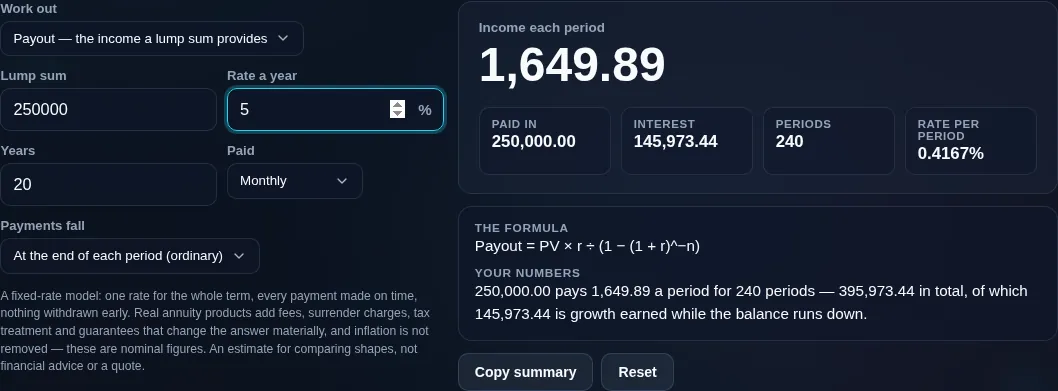
Annuity calculator in payout mode, showing the regular income a lump sum provides over a fixed term and the total received
The income a lump sum buys, in payout mode
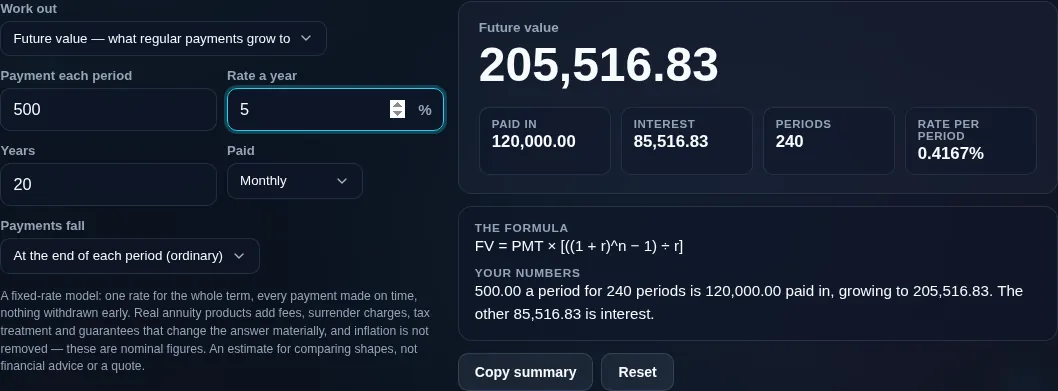
Annuity calculator showing what regular payments grow to, with the interest earned shown apart from the amount paid in
Future value of regular payments, with the interest separated from what was paid in
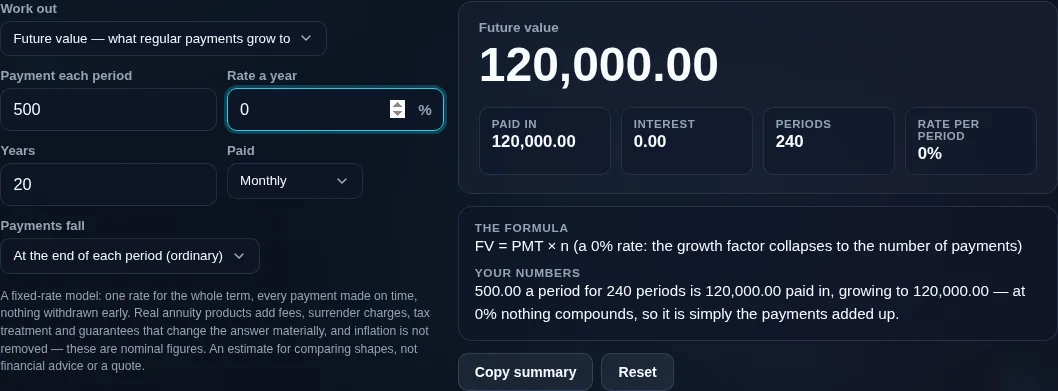
Annuity calculator at a zero per cent rate, where the standard formula divides by zero and the tool falls back to the linear answer instead of printing NaN
The same figures at a zero rate, where the formula is 0 ÷ 0 and the answer is linear
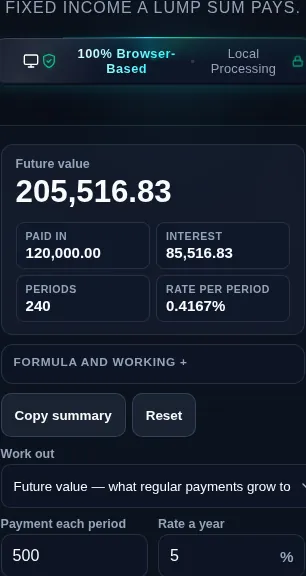
Annuity calculator running in a phone browser with the frequency and timing controls stacked
Mobile browser

When an annuity calculator helps

Here *r* is the interest rate per period and *n* is the number of periods. You can set the payment frequency (annual or monthly) and choose ordinary annuity (payments at the end of each period) or annuity due (payments at the start) — an annuity due is simply the ordinary result multiplied by (1 + r). The tool shows the value or payment, the total paid in or received, and the total interest, with the formula displayed.

One honest and important distinction: this is pure time-value-of-money math on a fixed rate — it is not a quote for a commercial annuity product. Annuities sold by insurers include fees, commissions, surrender charges, optional riders, and variable or indexed returns, and they're priced using mortality assumptions this calculator knows nothing about. Real returns also vary. Treat these figures as a clean estimate for understanding the mechanics, not financial, tax, or retirement advice, and not a promise of what any product will pay.

For turning savings into income more flexibly, see the Savings Drawdown Calculator; for growth of contributions, the Compound Interest Calculator. Everything runs privately in your browser.

  • Retirement income. Estimate the fixed income a lump sum could provide.
  • Comparing offers. Sanity-check an annuity quote against the plain math.
  • Saving toward a goal. Future value of regular contributions.
  • Valuing a payment stream. Present value of a pension or settlement.
  • Coursework. Ordinary vs annuity due, present and future value.

Realistic example. A $100,000 lump sum, paying out over 20 years at 4% a year, gives roughly $7,358 per year (ordinary): 100,000 × 0.04 ÷ (1 − 1.04⁻²⁰). Monthly, use r = 0.04/12 and n = 240.

Advanced tip. Switch between ordinary and due to see how payment timing changes the result — paying at the start of each period (due) is always worth a little more.

Common mistake to avoid. Don't treat this as an insurer's guaranteed payout. Product fees and terms will change the real number.

Related. For flexible, variable-withdrawal income (not a fixed annuity), use the Savings Drawdown Calculator.

What to keep in mind

  • Pure time-value math. These are textbook annuity formulas on a fixed rate — not a commercial annuity quote.
  • Products differ. Insurer annuities add fees, surrender charges, riders, and variable returns this ignores.
  • Not tax advice. Annuity taxation varies by country and product type.
  • Not financial or retirement advice. It's a calculator; consult a qualified professional for decisions.
  • Currency-agnostic and private. Works in any currency, and all math runs on your device — nothing uploaded.
Frequently Asked Questions

What is an annuity in this calculator?

Here, an annuity is simply a series of equal payments over time — the pure time-value-of-money version. The tool works out its future value (what regular payments grow to), its present value (what a future stream is worth today), or the fixed income a lump sum can pay. It's the underlying math, separate from any commercial annuity product an insurer might sell.

---

How do I calculate the future value of an annuity?

Future value = PMT × [((1 + r)ⁿ − 1) ÷ r], where PMT is the payment per period, r is the rate per period, and n is the number of periods. For example, $2,000 a year for 20 years at 5% grows to about $66,132. For an annuity due (payments at the start of each period), multiply the result by (1 + r). The tool shows the formula with your numbers.

---

How do I calculate the present value of an annuity?

Present value = PMT × [(1 − (1 + r)⁻ⁿ) ÷ r]. It tells you the lump sum today that's equivalent to a stream of future payments, discounting them back at rate r. For example, $5,000 a year for 10 years at 4% is worth about $40,554 now. It's used to value pensions, settlements, and payment streams.

---

How much income does a lump sum annuity pay?

The fixed payment a lump sum provides = PV × r ÷ (1 − (1 + r)⁻ⁿ). For example, $100,000 over 20 years at 4% a year pays about $7,358 annually. For monthly income, use r = annual rate ÷ 12 and n = years × 12. Remember this is the pure math — a real insurer product would price in fees and its own assumptions.

---

What's the difference between an ordinary annuity and an annuity due?

In an ordinary annuity, payments happen at the end of each period; in an annuity due, they happen at the start. Because payments in an annuity due arrive one period earlier, they have slightly more time to earn interest, so its value is the ordinary value multiplied by (1 + r). Rent and leases are often annuities due; loan payments are usually ordinary.

---

What rate and frequency should I use?

Use the return or discount rate that fits your situation, expressed per period. If you enter an annual rate but pay monthly, the tool converts it to a monthly rate (annual ÷ 12) and uses n = years × 12. Pick a realistic, conservative rate — a higher assumed rate flatters future value and inflates the income a lump sum appears to provide.

---

Does this include a commercial annuity product's fees?

No. This is pure time-value-of-money math on a fixed rate. Annuity products sold by insurers include commissions, administration fees, surrender charges, optional riders, and often variable or indexed returns priced with mortality assumptions — none of which this calculator models. Use it to understand the mechanics or sanity-check a quote, not as the quote itself.

---

How is an annuity taxed?

It depends on your country, the type of annuity, and whether it was bought with pre-tax or after-tax money — so this tool doesn't attempt it. In many places, the growth portion of payments is taxable while a return-of-capital portion may not be. The figures here are pre-tax estimates; check the rules for your jurisdiction or ask a tax professional.

---

Is an annuity better than a lump sum?

There's no universal answer — it depends on your age, health, other income, the rate offered, fees, inflation protection, and how much you value guaranteed income versus flexibility and control. This calculator can show you the plain math behind each side, but it can't weigh your circumstances. It isn't advice; a qualified adviser can help you compare properly.

---

Can I use monthly payments?

Yes. Set the frequency to monthly and the tool uses a monthly rate (annual ÷ 12) and the total number of months (years × 12). This is useful for retirement income, where payments usually arrive monthly. The same formulas apply — only the period rate and number of periods change.

---

Is this financial advice?

No. This calculator performs standard annuity arithmetic on the numbers you enter — it doesn't recommend buying an annuity, choosing a product, or taking a lump sum. Results are estimates on a fixed rate and exclude product fees and taxes. For decisions about retirement income, consult a qualified financial professional.

---

Is my data uploaded, and does it work offline?

No upload, and yes it works offline. Every calculation runs entirely in your browser, so your figures are never sent to a server, there's no account, and no tracking. Once the page has loaded it keeps working with no connection — useful for private retirement planning you'd rather keep off a sales-driven site.

Still have questions?

If you can't find the answer you're looking for, feel free to contact our support team.

Contact Us