Random Team Generator — Split into Groups

Split a list of names into random, balanced teams — choose the number of teams or the team size.

100% Browser-Based Local Processing
0 names

Nothing is saved until you press Save roster.

Press Space to shuffle again.Tap Generate teams again to reshuffle.

Paste a roster and press Generate teams — names are shuffled with a secure random generator, and nothing leaves your browser.

Privacy Focused

🔒 Local Processing. Your names and lists never leave your device.

Instant Results

🌐 Fully Client-Side. Runs instantly in your browser.

No Signup

⚡ No accounts. No API keys. Just open and use.

Browser Based

🚀 No installs, no sign-ups, no server round-trip.

What is a Random Team Generator — Split into Groups?

Random Team Generator splits a list of names into random, balanced teams. Paste your names and choose either how many teams you want or how many people per team, and it shuffles and divides them fairly — distributing any remainder evenly. It runs entirely in your browser.

Picking teams by hand is slow and rarely feels fair. This generator takes your list of names and divides everyone into random groups in one click — ideal for PE classes, group projects, sports, game nights, and workshops.

It runs entirely in your browser, so your roster stays private. The split is fair: names are shuffled with a secure random generator and then divided, with any leftover people spread evenly so the teams stay balanced.
How to generate random teams

Step 1: Paste your names, one per line

Paste your names, one per line.

Step 2: Choose how to split: a number of teams, or a fixed team size; optionally name the teams

Choose how to split: a number of teams, or a fixed team size; optionally name the teams.

Step 3: Generate — the names are shuffled and divided into balanced groups

Re-generate for a different split, or copy/download the result.

Random Team Generator — Split into Groups in action

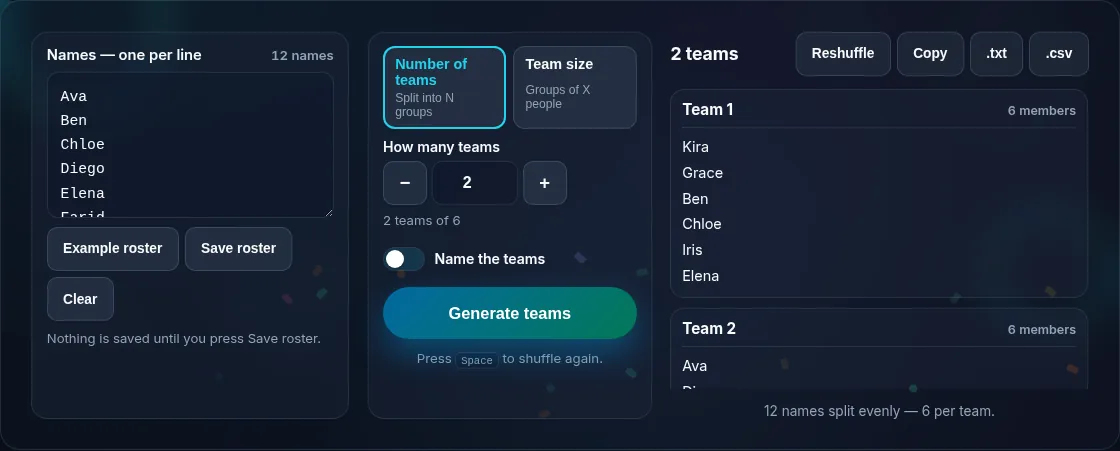
Names split into balanced random teams.
Names + generated teams
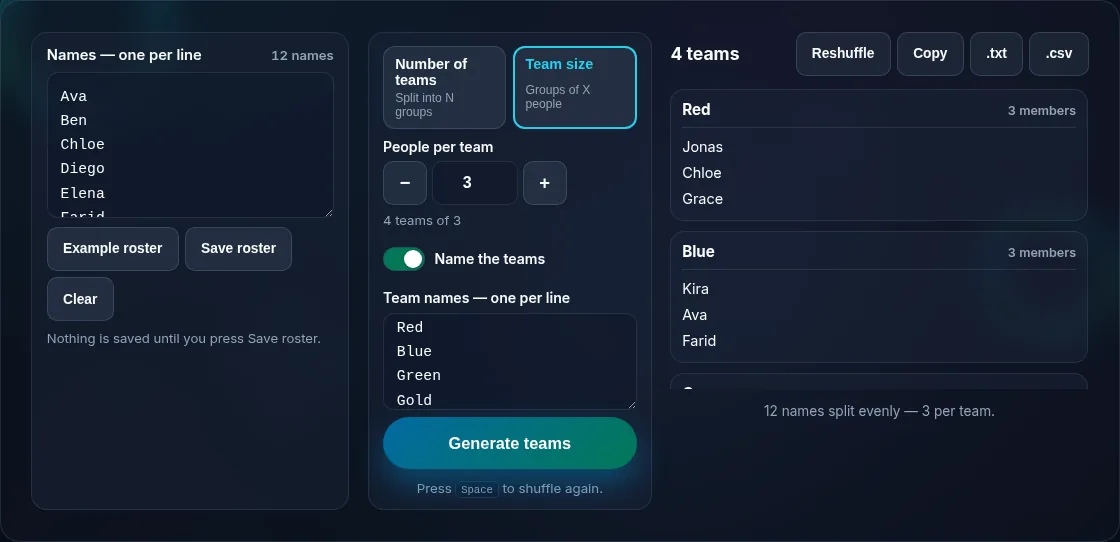
Choosing number of teams or team size.
By size vs count
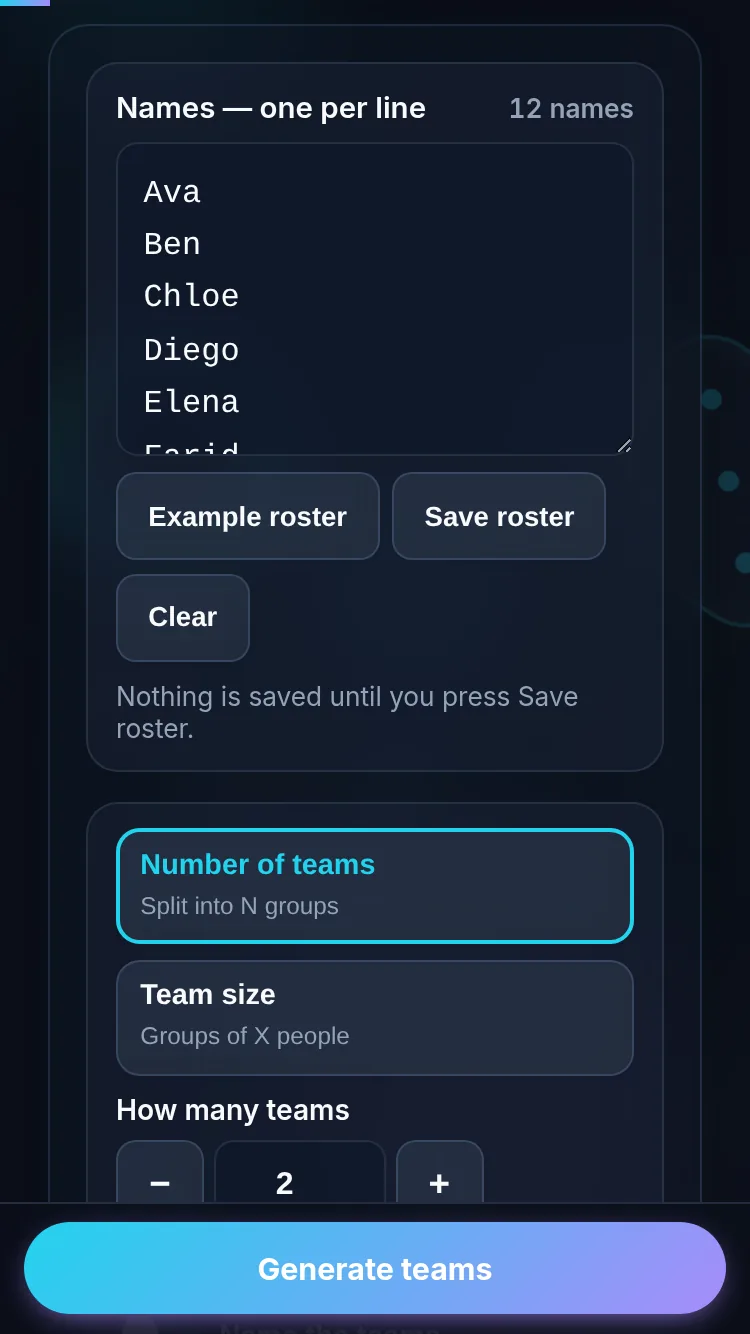
Generating teams on a phone, no app installed.
Mobile (stacked)

Balanced, fair team assignment

Two things make team generation fair: the assignment must be random, and the teams should be balanced. This tool shuffles your names with a secure random generator (an unbiased Fisher–Yates shuffle) before splitting, so no one can predict or influence who lands where. When the number of people doesn't divide evenly, the remainder is distributed one-per-team rather than dumped on one group, so team sizes differ by at most one. You can split by a set number of teams or by a target team size, whichever fits your activity. Everything runs locally, so your roster isn't uploaded. To shuffle a list without grouping, use the List Randomizer; to pick a single person, use the Wheel of Names.

Frequently Asked Questions

How do I split names into teams?

Paste your names one per line, then choose either the number of teams you want or how many people each team should have. The tool shuffles everyone and divides them into groups, showing each team's members. Re-generate any time for a fresh, different split.

Are the teams balanced when numbers don't divide evenly?

Yes. When the total doesn't divide evenly, the leftover people are distributed one per team rather than piled onto a single group, so team sizes differ by at most one. That keeps the split fair and avoids one lopsided team.

Is the assignment actually random?

Yes. Names are shuffled with your browser's secure random generator using an unbiased algorithm, then split, so the team each person ends up on is genuinely random and can't be predicted or influenced. That makes it fair for classrooms, sports, and competitions.

Can I choose team size instead of team count?

Yes. You can split by the number of teams (e.g., 4 teams) or by team size (e.g., teams of 3), whichever suits your activity. Pick by size when each group needs a specific headcount, and by count when you have a fixed number of teams.

Can I name the teams and reuse my roster?

Yes. You can label teams (Team A, Red/Blue, etc.) and save your list of names locally so you don't have to retype it next time. The roster stays in your browser; it isn't uploaded to a server.

Is my roster private?

Yes. Everything runs in your browser, so the names you enter are processed locally and never uploaded. Nothing is stored after you close the tab unless you choose to save it, so student or staff names stay on your device.

Is it private — is anything uploaded?

No. Everything runs in your browser, so whatever you enter is processed on your own device and never uploaded. Nothing is stored once you close the tab unless you choose to save it. That keeps your lists, names, and data private.

Is it free, and do I need to sign up?

Yes, it's completely free with no account, no trial, and no limit on how many times you use it. Because it runs entirely in your browser, there are no server costs, no usage caps, and no watermark or branding added to your result.

Does it work on a phone?

Yes. It runs in your phone's browser with nothing to install, so you can use it on Android or iOS. The layout adapts to small screens, making it easy to use on the go, at a party, or in a classroom.

Does it work offline?

Once the page has loaded, it runs entirely on your device, so it keeps working without a connection — which is also why nothing is uploaded. You only need to be online to open the page the first time; after that the tool works locally.

Can I copy or share the result?

Yes. You can copy the result to your clipboard with one click, and many results can be downloaded or shared. Everything is generated locally, so copying and sharing are instant with no upload step.

Is the randomness fair?

Yes. The tool uses your browser's secure random number generator, so every outcome is genuinely unpredictable and each option has an equal chance. It isn't weighted or rigged — results are as fair as a well-shuffled deck or an even spin.

Still have questions?

If you can't find the answer you're looking for, feel free to contact our support team.

Contact Us