A Randomly.online app
LexiFloat: the offline dictionary that cannot go online
LexiFloat is a free English dictionary that works with no internet at all. All 161,697 words ship inside the app. A small bubble floats over any other app, so you can look a word up without leaving the page you are reading. The Android app never asks for the internet permission, so Android itself stops it from sending anything.
- Windows 10 and 11
- Linux: Flatpak and .deb
- Android 8.0+, closed testing
- Free, no account
- Version 1.0.0
LexiFloat in eleven facts
| What it is | An offline English dictionary app with a floating lookup bubble |
|---|---|
| Words | 161,697, with 212,470 definitions and 104,237 example sentences |
| Source | Open English WordNet 2024, CC BY 4.0. No definition is written by AI |
| Platforms | Android 8.0 and later, Windows 10 and 11, Linux. No iPhone or Mac version |
| Android status | On Google Play in closed testing. Email to join the test |
| Desktop status | Version 1.0.0, released 3 October 2026 |
| Download size | Android 61.9 MB. Windows .msi 167.7 MB. Linux Flatpak 130.1 MB, .deb 144.5 MB |
| Price | Free. No ads, no account, no in-app purchases |
| Android permissions | Four: draw over other apps, two foreground service permissions, and notifications. Internet is not one of them |
| Your data | Notebooks, notes and settings stay on your device |
| Made by | Dhruba Singha Roy, founder of Randomly.online |
Why does Randomly.online make a dictionary?
Every tool on Randomly.online runs inside your browser. Your PDF, photo or spreadsheet is processed on your own device and never uploaded. That rule is the reason the site exists. LexiFloat is the same rule, built as an app.
A website can only promise not to upload. An Android app can go further. To reach the network, an app has to list android.permission.INTERNET in its manifest, and LexiFloat leaves it out. There is no setting to switch it back on and no hidden fallback. Android refuses the connection before the app has any say.
So nobody has to trust a privacy policy. They can read a permission list.
What LexiFloat looks like on Android
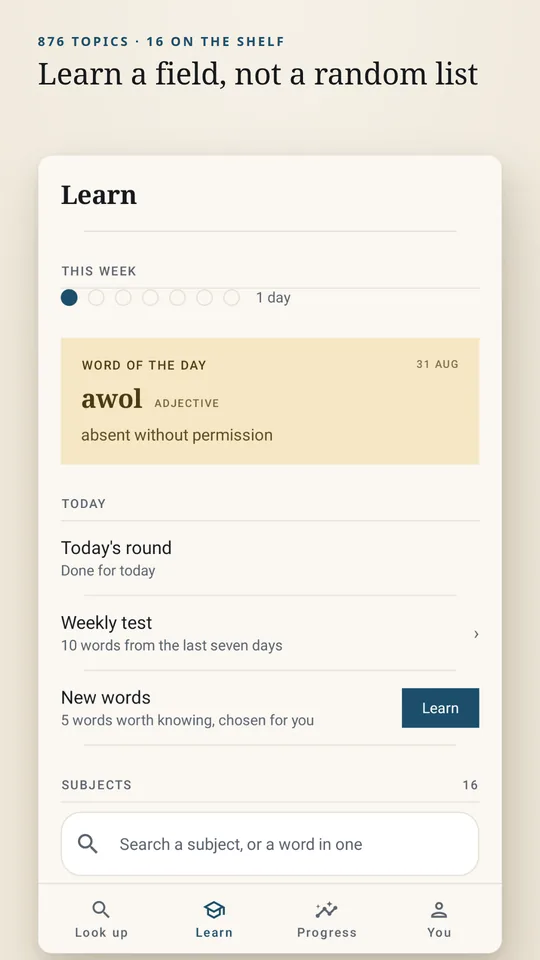
What can LexiFloat do?
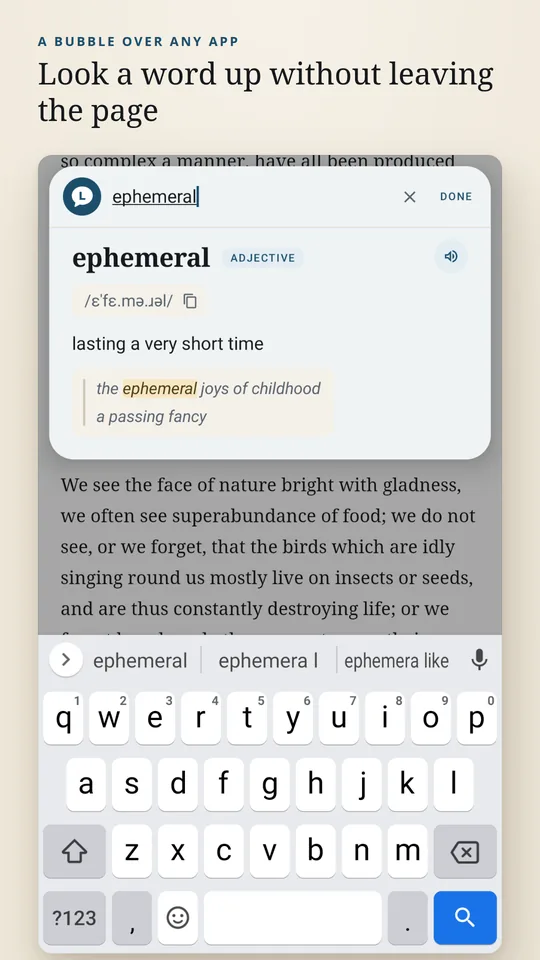
- Floating bubbleThe bubble parks at the edge of the screen while you use other apps. Tap it and a search card opens over the page, keyboard already up.
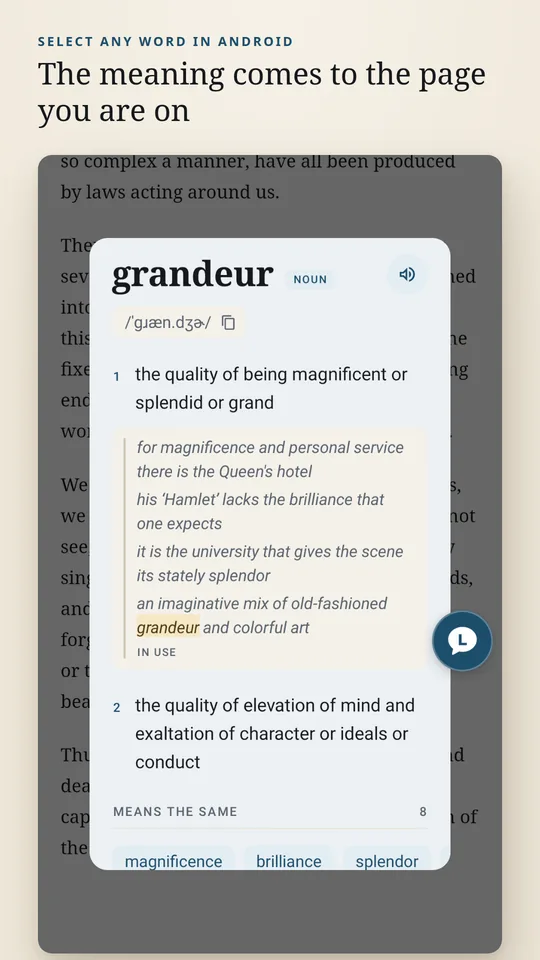
- Look up from any appSelect a word in a browser, an e-book reader or a chat, then choose LexiFloat in the text menu.
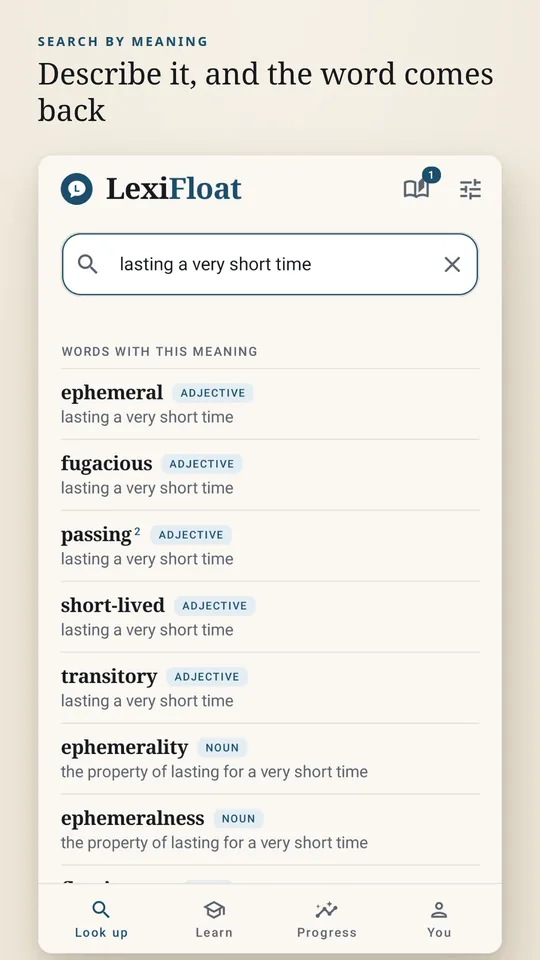
- Search by meaningType "fear of open spaces" and you get agoraphobia. The search reads definitions as well as headwords.
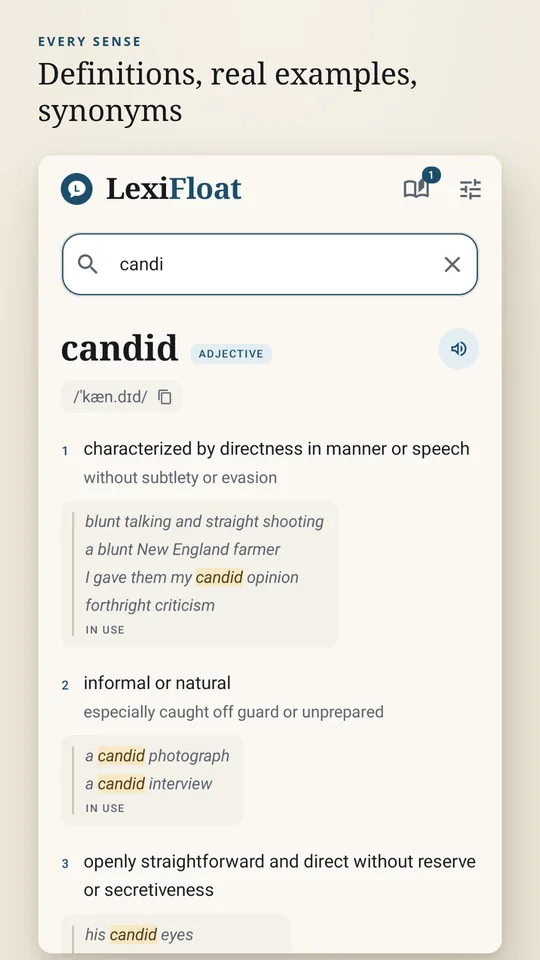
- Forgives typosMisspellings match close words. Inflected forms find their entry, so "running" opens "run".
- Daily notebookStay on a word for three seconds and it is filed in that day's notebook. Export a day, month or year to PDF or a spreadsheet.
- Learn tabWord of the day, a daily quiz round, a weekly test and a streak. Words are grouped into 876 topics.
- Desktop hotkeyOn Windows and Linux, select a word in any program and press Ctrl+Alt+D.
- Easy to readDark mode and adjustable text size. Tap the pronunciation to copy it.
How can you check that LexiFloat never goes online?
On a phone, open Settings, then Apps, then LexiFloat, then Permissions. Internet is not on the list. Developers can read the same list straight from the app file:
$ aapt2 dump permissions LexiFloat-1.0.0-release.apk
android.permission.SYSTEM_ALERT_WINDOW            the floating bubble
android.permission.FOREGROUND_SERVICE             keeps the bubble alive
android.permission.FOREGROUND_SERVICE_SPECIAL_USE declares why
android.permission.POST_NOTIFICATIONS             how you stop it
One honest exception. The speaker button passes the word to your phone's own text-to-speech engine. That engine is a different app with its own permissions, and some engines download voices. If that matters to you, leave the speaker alone.
And on the desktop?
The Linux Flatpak runs in a sandbox with no network device at all. The Windows installer and the Linux .deb contain no networking code, but they are not sandboxed, so for them it is the code that keeps them offline, not the system.
What should you check before installing an offline dictionary?
- Does it need the internet on first run? Some "offline" dictionaries download their word data after you install them. LexiFloat ships with all of it.
- Does it ask for the internet permission? Look at the app's permission list. An app that has it can send data whenever it likes.
- Is the source named? A good dictionary tells you where the definitions come from. LexiFloat uses Open English WordNet 2024 and credits it.
- Can you look up without switching apps? Copying a word, opening another app and pasting it loses your place. A bubble or a text-menu lookup keeps it.
- Can you take your words with you? If you save words, check you can export them. LexiFloat writes PDF and spreadsheet files.
- Are there ads or trackers? Ad and analytics libraries need the network. No internet permission means neither can be inside.
Every page on lexifloat.com
- LexiFloat homeWhat the app does, the full permission list and the FAQ.lexifloat.com
- Download LexiFloatEvery version in one place, plus the macOS status.lexifloat.com/download
- Offline dictionary for WindowsThe installer, the SmartScreen note, Ctrl+Alt+D and the checksum.lexifloat.com/download/windows
- Offline dictionary for LinuxFlatpak with no network device, the .deb, shortcut setup and checksums.lexifloat.com/download/linux
- Offline dictionary for AndroidThe closed test, Android 8.0 and later, and how to join.lexifloat.com/download/android
- About LexiFloatWho builds it, how it is built and what it does not do yet.lexifloat.com/about
- Privacy policyWhat stays on the device, and why nothing can leave it.lexifloat.com/privacy
- Terms of useThe licence position and what the dictionary is not.lexifloat.com/terms
- ContactBug reports, missing words and closed-test access.lexifloat.com/contact
LexiFloat questions, answered
What is LexiFloat?
LexiFloat is a free offline English dictionary for Android, Windows and Linux, made by Dhruba Singha Roy, the founder of Randomly.online. All 161,697 words ship inside the app, a floating bubble defines words on top of whatever you are reading, and the Android app has no internet permission. Its own site is lexifloat.com.
Is LexiFloat free?
Yes. There is no paid tier, no subscription, no advertising and no account. The definitions come from an openly licensed source, so there is nothing to charge for, and an ad library would need the internet permission the app was built without.
Does LexiFloat work without the internet?
Yes, all of it. The full dictionary is stored in the app file, so lookups work in aeroplane mode or on a phone with no SIM. There is no online mode to fall back to. The one exception is the speaker button: it hands the word to your phone's own text-to-speech engine, which is a separate app and may download voices.
Is LexiFloat made by Randomly.online?
Yes. Both are built by the same person, Dhruba Singha Roy, and support for both goes to [email protected]. LexiFloat has its own website because it is a separate product with its own downloads, privacy policy and terms. This page is its home on Randomly.online.
How do I get LexiFloat on Android?
Version 1.0.0 is on Google Play in closed testing, so it is not publicly listed yet. Email [email protected] to join the test and the Play link comes back by mail. It needs Android 8.0 or later and is a 61.9 MB download. Details are on the Android download page.
Does LexiFloat work on Windows and Linux?
Yes. Version 1.0.0 for Windows 10 and 11 and for Linux came out on 3 October 2026, free from lexifloat.com/download. It has the same 161,697-word dictionary, search by spelling or meaning, the floating bubble and the notebook. Select a word in any program and press Ctrl+Alt+D to look it up.
Is there a LexiFloat app for iPhone or Mac?
No. There is no iOS version and none is planned yet. macOS is listed as not yet available on the download page.
Where do LexiFloat's definitions come from?
From Open English WordNet 2024, a lexicon maintained by linguists and released under the CC BY 4.0 licence. That gives 212,470 definitions and 104,237 example sentences. No definition is written by an AI model, and where WordNet has no example the entry simply has none.
Can I find a word when I only know what it means?
Yes. LexiFloat searches the definitions as well as the words. Type “lasting a very short time” and it returns ephemeral, fugacious, short-lived and transitory. Misspellings match close words, and “running” finds “run”.
Does LexiFloat collect any data?
No. On Android it asks for four permissions and internet is not one of them, so it has no way to send anything. Your notebooks, notes and settings stay in a database on the device. You can check the list under Settings, Apps, LexiFloat, Permissions. The full detail is in the privacy policy.
Why is the Android download 61.9 MB?
Because the dictionary is inside it. A small dictionary app fetches each definition from a server when you look it up. LexiFloat downloads everything once and then never uses the network again.
Free word tools that also run on your device
- Word counterWords, characters and sentences, counted in your browser.
- Readability score checkerHow hard is your text to read? Scores it without sending it anywhere.
- Word frequency counterSee which words you repeat most.
- All text toolsSixty free text tools. Nothing is uploaded.
- About Randomly.onlineThe site behind LexiFloat, and why every tool runs on your device.