ROI Calculator

Calculate return on investment (ROI) and annualized ROI (CAGR) from your cost and return, with the formula shown.

100% Browser-Based Local Processing
yr
mo

ROI is the total return over the whole holding period; annualised ROI (CAGR) is the steady yearly rate that would have produced it. Past return says nothing about future return. Not financial advice.

Return on investment

50.00%

Net profit 5,000.00
Annualised (CAGR) 14.47%
Your money became 1.50×
Formula and working

The formula

ROI = (final − initial) ÷ initial × 100 · CAGR = (final ÷ initial)^(1/years) − 1

Your numbers

(15,000 − 10,000) ÷ 10,000 = 50.00% over 3 years, an annualised 14.47%.

Privacy Focused

🔒 Local Processing. Your numbers never leave your device.

Instant Results

🌐 Fully Client-Side. Runs instantly in your browser.

No Signup

⚡ No accounts. No API keys. Just open and use.

Browser Based

🚀 No installs, no sign-ups, no server round-trip.

What is a ROI Calculator?

An ROI Calculator measures the return on an investment as a percentage of its cost. ROI = (net profit ÷ initial investment) × 100. Enter what you put in and what you got out and it shows the ROI and net profit, plus the annualized return (CAGR) when you give a holding period — so you can compare investments fairly. It runs in your browser.

Return on investment (ROI) is the simplest measure of how an investment performed: the gain relative to what you put in. It's used for everything from stocks to marketing campaigns to comparing opportunities.

This calculator gives the ROI percentage and net profit, and crucially the annualized return, so you can compare investments held for different lengths of time on a level footing. It runs entirely in your browser.
How to calculate ROI

Step 1: Enter the initial investment (cost) and the final value or total return

Enter the initial investment (cost) and the final value or total return.

Step 2: Read the ROI percentage and the net profit

Read the ROI percentage and the net profit.

Step 3: Add the holding period to see the annualized return (CAGR)

Add the holding period to see the annualized return (CAGR).

ROI Calculator in action

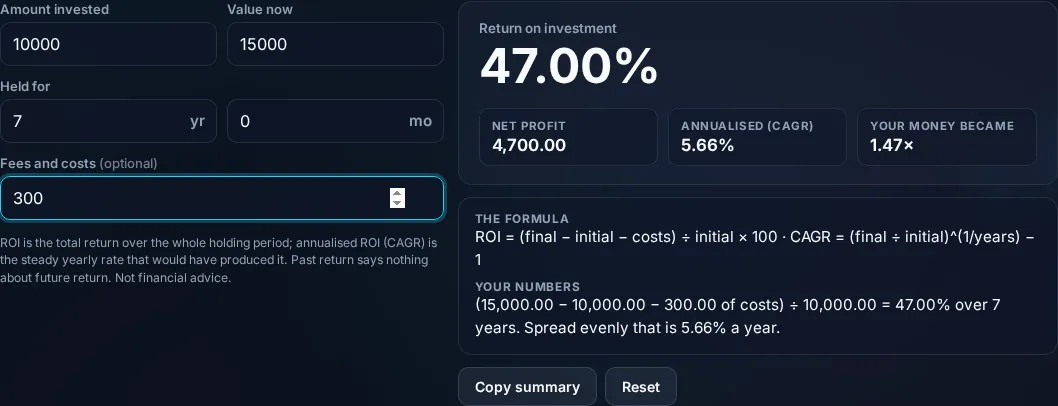
ROI Calculator showing return on investment in the browser.
ROI + profit
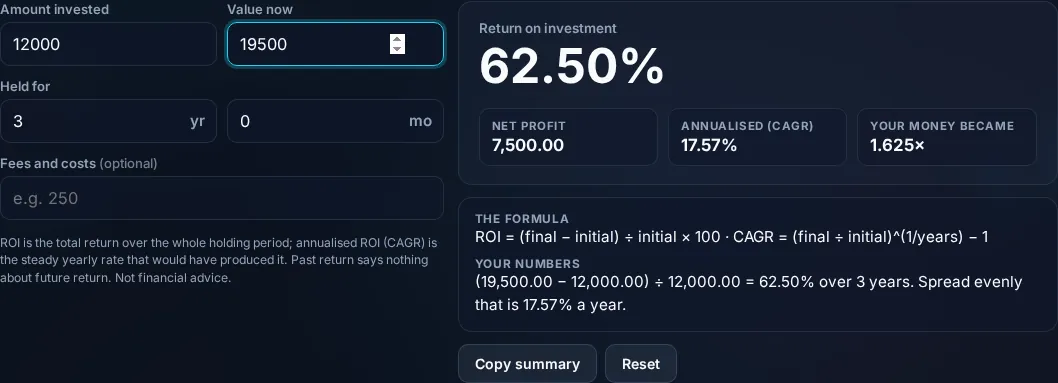
ROI with annualized return (CAGR) and the formula.
Annualized
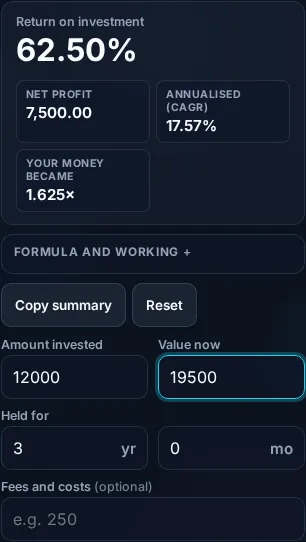
Calculating ROI on a phone, no app installed.
Mobile (stacked)

ROI, net profit, and why annualized matters

Basic ROI is net profit divided by cost, as a percentage: ROI = ((final value − initial investment) ÷ initial investment) × 100. A $1,000 investment now worth $1,300 has a profit of $300 and an ROI of 30%; a loss gives a negative ROI. Simple ROI is great for a quick read, but it has a blind spot: it ignores time. A 30% ROI earned in one year is far better than 30% earned over ten years, yet plain ROI shows them as equal. That's why the calculator also computes the annualized return, or CAGR (compound annual growth rate), using CAGR = (final ÷ initial)^(1 ÷ years) − 1, which expresses the return as a steady yearly rate and lets you compare investments held for different periods fairly. Be clear on the limits: ROI here is based on the cost and value you enter and doesn't account for fees, taxes, dividends reinvested, or the timing of additional cash flows (for irregular cash flows, measures like IRR are more appropriate). It's a performance measure, not financial advice. Everything computes locally in your browser. For projecting future growth, use the Compound Interest Calculator.

Frequently Asked Questions

How do I calculate ROI?

ROI = (net profit ÷ initial investment) × 100, where net profit is the final value minus the initial investment. If you invested $1,000 and it's now worth $1,300, ROI = (300 ÷ 1000) × 100 = 30%. The calculator shows this and the net profit, with the formula.

What is annualized ROI (CAGR)?

It expresses your total return as a steady annual rate, so investments held for different lengths of time can be compared. The formula is CAGR = (final ÷ initial)^(1 ÷ years) − 1. A 30% total return over 3 years is about 9.1% per year annualized, which the calculator computes when you enter the holding period.

Why is annualized return better for comparing investments?

Because plain ROI ignores time: 30% in one year and 30% over ten years look identical as ROI but are wildly different investments. Annualizing converts both to a yearly rate, revealing the one-year investment as far superior. Always compare annualized returns when holding periods differ.

Can ROI be negative?

Yes. If the final value is less than the initial investment, you've made a loss and the ROI is negative — for example, $1,000 falling to $800 is an ROI of −20%. The calculator handles losses and shows the negative percentage so you can quantify the downside.

What does this ROI calculation leave out?

It uses only the cost and final value you enter, so it doesn't account for fees, taxes, dividends or interest received, or the timing of extra contributions and withdrawals. For investments with irregular cash flows, a measure like IRR (internal rate of return) is more accurate. Treat this as a clean headline ROI.

Is ROI the same as profit?

Not quite. Profit is the absolute gain in currency (e.g. $300); ROI is that gain as a percentage of what you invested (30%), which lets you compare investments of different sizes. A large profit on a huge investment can be a small ROI, and vice versa — the calculator shows both.

Is it free, and do I need to sign up?

Yes, it's completely free with no account, no trial, and no limit on how many times you use it. It runs entirely in your browser, so there's no sign-in wall — just open the page and calculate.

Is my data private?

Yes. Everything is calculated in your browser — the numbers you enter are never sent to a server, and nothing is stored once you close the tab. That keeps any personal figures (salary, loan, health) on your own device.

Does it work on mobile?

Yes. It runs in your phone's browser with nothing to install, so you can calculate on Android or iOS. The layout adapts to small screens, so entering numbers and reading the result is easy on the go.

Does it work offline?

Once the page has loaded, the calculation runs entirely on your device, so it keeps working without a connection. You only need to be online to open the page the first time — which is also why nothing you enter is uploaded.

Can I copy or share the result?

Yes. You can copy the result to your clipboard with one click, and many results can be shared. Because everything is calculated locally, copying is instant with no upload step.

How accurate is it, and is this professional advice?

The math is accurate for the inputs you give, and the formula is shown so you can verify it. But results are estimates for general use, not professional advice — finance calculators use simplified assumptions and ignore fees and rate changes, and health calculators are general estimates, not medical advice. For important decisions, consult a qualified professional.

Still have questions?

If you can't find the answer you're looking for, feel free to contact our support team.

Contact Us