Running Pace Calculator

Calculate running pace, time, or distance — solve any one from the other two — with race presets, splits, and min/km or min/mile units.

100% Browser-Based Local Processing
What do you need?
h
m
s

Splits assume you hold an even pace the whole way. Real races rarely work out that way — hills, wind and fade all move the later splits.

Pace

5:00 /km

Per km 5:00
Per mile 8:03
Speed 12.00 km/h
Speed 7.46 mph
Formula and working

The formula

pace = time ÷ distance

Your numbers

50:00 ÷ 10 km = 5:00 per km.

Split times

Privacy Focused

🔒 Local Processing. Your numbers never leave your device.

Instant Results

🌐 Fully Client-Side. Runs instantly in your browser.

No Signup

⚡ No accounts. No API keys. Just open and use.

Browser Based

🚀 No installs, no sign-ups, no server round-trip.

What is a Running Pace Calculator?

A Running Pace Calculator works out your pace, time, or distance when you know the other two. Enter any two — say a 10 km run in 50 minutes — and it gives the third (a 5:00 min/km pace). It supports min/km and min/mile, race-distance presets, finish times, and split tables, and runs in your browser.

Pace, time, and distance are linked: pace is time divided by distance. Runners constantly switch between them — what pace hits a target finish, what time a pace gives over a marathon, how far a tempo run was.

This calculator solves for whichever you're missing, in metric or imperial, with race presets and split tables. It runs entirely in your browser, so it works offline on your phone at the track.
How to calculate running pace

Step 1: Choose what to solve for: pace, time, or distance

Choose what to solve for: pace, time, or distance.

Step 2: Enter the two values you know (use a race preset for distance if handy)

Enter the two values you know (use a race preset for distance if handy).

Step 3: Read the result, plus your speed and a split table if you want them

Read the result, plus your speed and a split table if you want them.

Running Pace Calculator in action

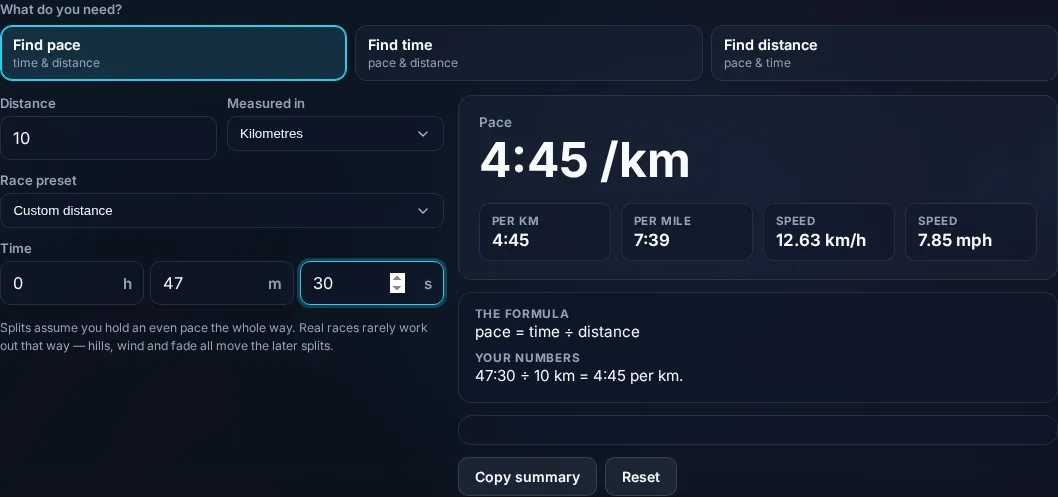
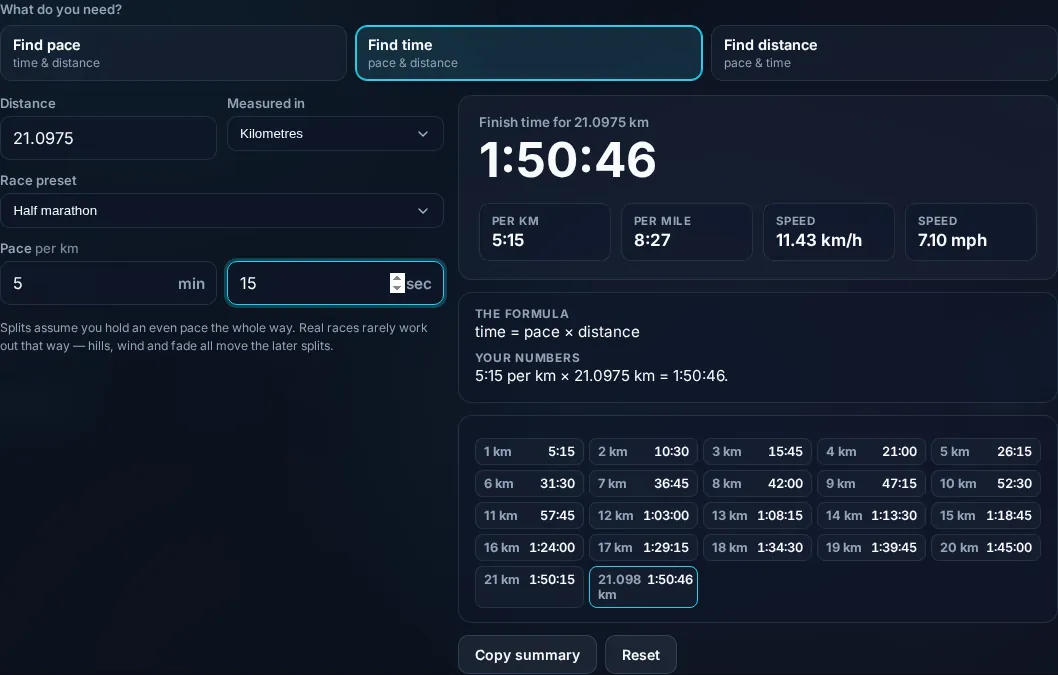
Running Pace Calculator solving pace, time, and distance in the browser.
Pace result
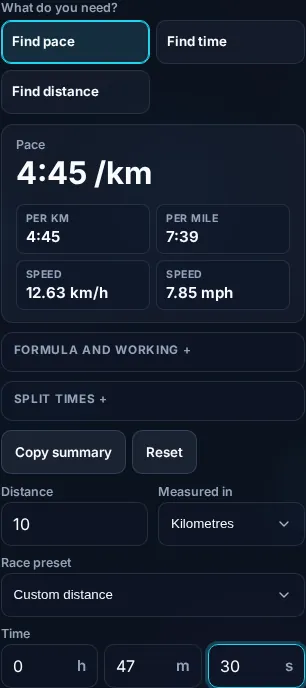
Race pace with a split table per kilometre.
Split table
Calculating running pace on a phone, no app installed.
Mobile (stacked)

Pace, time, distance — and even splits

The relationship is simple: pace = time ÷ distance, time = pace × distance, and distance = time ÷ pace. Pace is usually expressed as minutes per kilometre or minutes per mile (lower is faster), while speed is the inverse in km/h or mph (higher is faster) — the calculator shows both. Because the three values are interchangeable, you enter any two and get the third: give a distance and a target finish time to find the required pace, or a pace and a distance to project a finish time. Race-distance presets (5K, 10K, half marathon, marathon) save you typing common distances. The split table is especially useful: it lists the cumulative time you should hit at each kilometre or mile to maintain an even pace, which is how experienced runners avoid going out too fast — the most common pacing mistake. One honest caveat: the math assumes a perfectly even pace, whereas real runs vary with hills, wind, heat, and fatigue, so treat projected finish times as targets for steady effort rather than guarantees, and adjust for the course. Everything computes locally in your browser and works offline. For trip distances by car, see the Fuel Cost Calculator.

Frequently Asked Questions

How do I calculate running pace?

Divide your time by the distance: pace = time ÷ distance. A 10 km run in 50 minutes is a pace of 5:00 per km. Enter the time and distance and the calculator gives the pace in minutes per kilometre or per mile, plus your speed in km/h or mph.

How do I work out a finish time from a pace?

Multiply your pace by the distance: time = pace × distance. At 5:30 per km over 21.1 km (a half marathon), that's about 1 hour 56 minutes. Enter your target pace and the distance (or pick a race preset) and the calculator projects the finish time.

What pace do I need for a target finish time?

Divide your target time by the distance. For a sub-4-hour marathon (42.195 km), 4:00:00 ÷ 42.195 ≈ 5:41 per km. Enter the distance and your goal time and the calculator gives the pace you need to hold, which you can then use with the split table.

What's the difference between pace and speed?

Pace is time per distance (minutes per km or mile) — lower is faster. Speed is distance per time (km/h or mph) — higher is faster. They're inverses of each other. Runners usually think in pace; the calculator shows both so you can use whichever your watch or plan uses.

What is a split table for?

It shows the cumulative time you should reach at each kilometre or mile to hold an even pace for your target. Checking your watch against the splits keeps you from starting too fast — the classic pacing error — and helps you finish strong. The calculator generates the splits for your chosen pace and distance.

Will I actually run the projected time?

The projection assumes a steady, even pace, but real runs are affected by hills, wind, heat, fatigue, and how you feel on the day, so your actual time can differ. Use it as a target for even effort and adjust for a hilly or hot course. It's a planning guide, not a guarantee.

Is it free, and do I need to sign up?

Yes, it's completely free with no account, no trial, and no limit on how many times you use it. It runs entirely in your browser, so there's no sign-in wall — just open the page and calculate.

Is my data private?

Yes. Everything is calculated in your browser — the numbers you enter are never sent to a server, and nothing is stored once you close the tab. That keeps any personal figures (salary, loan, health) on your own device.

Does it work on mobile?

Yes. It runs in your phone's browser with nothing to install, so you can calculate on Android or iOS. The layout adapts to small screens, so entering numbers and reading the result is easy on the go.

Does it work offline?

Once the page has loaded, the calculation runs entirely on your device, so it keeps working without a connection. You only need to be online to open the page the first time — which is also why nothing you enter is uploaded.

Can I copy or share the result?

Yes. You can copy the result to your clipboard with one click, and many results can be shared. Because everything is calculated locally, copying is instant with no upload step.

How accurate is it, and is this professional advice?

The math is accurate for the inputs you give, and the formula is shown so you can verify it. But results are estimates for general use, not professional advice — finance calculators use simplified assumptions and ignore fees and rate changes, and health calculators are general estimates, not medical advice. For important decisions, consult a qualified professional.

Still have questions?

If you can't find the answer you're looking for, feel free to contact our support team.

Contact Us